


While advancements in AI have been front and center in the headlines for the last couple of years, the impact on the email space has only recently started to be seen. From proofing a marketer’s content to generating brand new campaigns to prioritizing and classifying messaging in a subscriber’s inbox, there are many ways email is evolving.
The most recent shift is the introduction of AI email summaries directly in the subscriber’s inbox by major mailbox providers. While this innovation is designed to enhance the recipient’s experience by offering quick previews of content, it presents significant challenges for marketers.
The traditional engagement model — relying on opens and click-throughs — is evolving, and the potential for lost brand voice or misinterpreted content is high. This blog post will help you navigate these changes, providing five actionable recommendations to ensure your email campaigns remain successful in the age of the AI-powered inbox.
Connections 26 is coming!
The blueprint for marketers has changed. Learn how you can incorporate agentic capabilities for your brand this June 3-4 in Chicago.



How AI email summaries have changed the inbox
Many companies have gone all-in on AI with varying degrees of success. Generative Pre-trained Transformer (GPT) models have taken huge leaps forward and are now being positioned as solutions to help marketers create better, more targeted emails. Largely, these AI capabilities are ecosystem specific. For example, Microsoft’s Copilot is baked directly into Outlook for this purpose.
When we’re talking about marketing emails that need to deliver an engaging and personalized design, can AI really be relied on to deliver?
It’s worth keeping in mind that AI is entirely data-driven, meaning outcomes of AI-generated content or messages can only ever be as good as the data that supplies it. Generative AI can certainly help speed up the content creation process for most marketers, especially in areas like subject line testing and image generation, but ensuring the design elements stay on brand still requires that human touch. AI tools are known to miss the mark on considerations for things like Dark Mode, accessible code and the multiple different rendering outcomes based on things like OS, browser, screen size and email client.
The most exciting use case for AI in email may be machine learning and predictive analytics, which will play an increasingly important role in personalization. Your AI strategy should be connected to your data and customer engagement strategy for optimal results. How AI impacts your subscriber’s inbox experience also has to be taken into consideration to ensure your future campaigns will be successful.
It’s important to understand that mailbox providers are also taking advantage of AI tools to improve the inbox experience for their users. AI email summaries are probably the biggest change to the AI-powered inbox – a subscriber doesn’t even have to open the message to see what the sender has to offer them. Gmail (Gemini Summaries), Yahoo (Catch Up), Microsoft (Copilot) and Apple Mail (Apple Intelligence Summaries) have all introduced AI summaries to the inbox with varying degrees of accuracy.
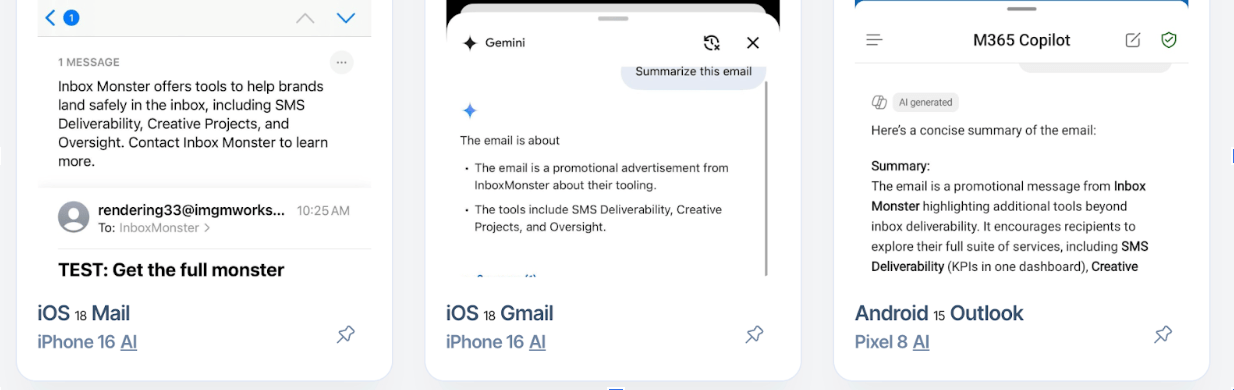
(This image shows an AI preview test from Inbox Monster for an email that contains live text in the body as well as alt text for the images which allows the AI summaries a more thorough understanding of the content.)
Our partners at Inbox Monster have some great insights on the impact of AI changes in this blog:
Inbox AI is rewriting your emails whether you like it or not. Apple, Gmail and Yahoo are pulling snippets, summaries and discount codes into inbox previews — sometimes making you look brilliant, other times making you look like you’re running a “100% off” sale. And the latest news from Gmail is that it will roll out the “AI Inbox” in 2026, bringing Gemini further into the fold with personalized summaries and to-dos of high-stakes items.
- The risks: lost brand voice, skewed engagement signals and tracking chaos.
- The fixes: prioritize live text, front-load key content, use schema and annotations and preview everything before you send.
Despite Apple Mail ignoring preheaders in favor of their AI email summaries feature, the preheader (also known as preview text) remains a popular way for marketers to engage their customers and can help drive engagement. The subject line may not offer you enough real estate to hook the reader into engaging with your messaging.
Using your preheader to effectively sell the value of how your company can help solve a problem is key to driving further engagement. Remember to always test, as a cleverly crafted preheader may not translate well in AI summaries, and be sure your subject line is clear and concise.
How AI summaries are impacting image-only emails
Image-only emails have never been considered an email best practice. A lack of live text creates accessibility issues and you run the risk of images being blocked by default in certain email clients.
Now, AI email summaries factor into the discussion as a lack of live text can mean that Apple may present a “too short to summarize” message in the inbox, and there are reports that Android AI will pull in footer text when the email body lacks live text. This would mean the Android summary would include the sender contact information and unsubscribe link, creating a poor recipient inbox experience.
Inbox Monster did some extensive testing on this front and found that Gemini consistently outperformed Apple Intelligence when it came to interpreting image-only emails for summaries. Here are the same three AI summaries shared above but this time run as image-only emails with no alt or live text included. You can see the value proposition of the subscriber engaging the message drastically declines for image only content.
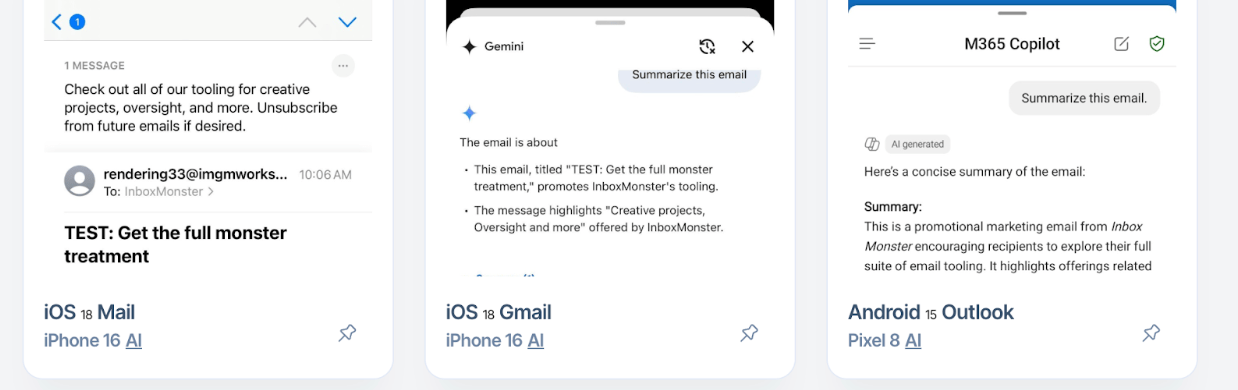
This image shows an AI preview test from Inbox Monster for an email that contains a hero image only with no live text or alt text to help with the summary. The subscriber experience varies from a suggestion to unsubscribe to a repeat of the subject line.
What will be AI’s-term impact on engagement?
The Inbox Monster team says AI summaries pose new challenges for marketers:
The catch: even if summaries are accurate, they change engagement. If subscribers can get what they need from a summary, they may never click through. That means skewed metrics and lost opportunities.
So what does this mean for the email marketer? According to Inbox Monster:
Don’t assume opens and clicks mean what they used to. AI summaries mean someone might read your email without technically opening it. Or they might click on an extracted discount code in a preview, bypassing your tracked CTA.
That means inflated or misleading engagement data. The fix: look beyond vanity metrics and double down on downstream conversions (site visits, purchases, sign-ups) to gauge performance.
Inbox Monster’s preview tools can show you how Apple and Gmail actually display your emails. Use that intel to A/B test copy placement, schema markup and design balance. The more you test, the more you’ll understand what AI is likely to surface and how to work with it instead of fighting it.
5 tips for tackling AI email summaries
- Get to the point in the first 20 characters of your subject line. The days of vague “baity” subject lines are behind us. Get to your value prop in the first 100 characters of your email body. Use clear and straight-froward language in these known AI summary zones.
- Make sure key points are in live text as opposed to images. This helps AI email summaries to be more clear and useful to your subscribers. Plus, if images are blocked, it helps you still deliver engaging content.
- Keep your message on point. According to Inbox Monster:
It’s tempting to try to get your email to do everything — talk about new products, invite customers to follow you on social media and ask recipients for a review. But just like humans, AI can get confused and misinterpret your email if there’s too much going on. Instead, focus on one core theme or goal for your email to avoid confusion from humans and bots alike.
- Open rates are likely to decline across the industry in the coming years. This doesn’t necessarily mean your content isn’t being seen. However, subscribers are likely to adapt to summarized inboxes and only engage further when something catches their interest. Adjust your tracking and reporting to focus on active signals from your subscribers, including click-through and conversion rates.
- AI is still evolving, which makes testing more critical than ever before. Understand your customers’ experience and plan accordingly. This is the time to be learning and adapting as more of your audience begins experiencing AI in their inbox in the coming years.
Take your email marketing up a notch
See how Agentforce Marketing gives you the tools to navigate AI inbox summaries and reach customers where they are.


