


Following the primer on investigating Salesforce security incidents and how to correlate logs to reconstruct what happened, customers have asked for more proactive approaches to detect and prevent anomalous activities in their environments using Shield Event Monitoring. Efficient anomaly detection and response make organizations more resilient, reducing disruption, cost, and impact.
The increasing use of Salesforce in many organizations generates large quantities of logs to track performance, API transactions, user account activities, and more. These data streams can support security monitoring for both insider threats and external attacks. Detecting unusual or anomalous activities using these logs involves analyzing behavior over time of user accounts, including humans and non-human identities such as integration accounts and AI agents. Anomaly detection is most effective when behavior is consistent and predictable, which is often the case in Salesforce usage, taking seasonality into account.
This blog post provides an overview of behavioral analysis for cybersecurity, and forensic purposes, concentrating on Real-time Event Monitoring (RTEM). Methods presented in this article can also be applied to non-realtime sources, including low-latency Event Log Objects (ELO), Event Log Files (ELF), and historical logs.
| Fictitious security incident scenario: An employee named Emma Martin usually accessed Salesforce data in a limited and predictable way. On March 2, Emma Martin’s account activity exhibited a sudden change in behavior, including higher levels of activity and viewing data she never looked at before. This anomalous activity triggered custom alerting and initiated an investigation to determine the reason for this change in behavior. It turns out that Emma Martin was going to work for another company and planned to take sensitive Salesforce information with her. The anomaly detection alerts enabled an immediate response to stop her from carrying out her plan. |
What is an anomaly?
An anomaly is any activity of a user account that is sufficiently different from the historical activity of the same user account. The Threat Detection events that come out-of-the-box with Salesforce Event Monitoring are designed to detect anomalies using certain features that are broadly applicable to all customers, and are not tuned to any specific environment to reduce false positives. Creating customized detections for your Salesforce environment requires an understanding of what is usual, and types of deviations to look for.
| Practitioner’s Tip: Salesforce Threat Detection anomaly events require raw logs to be transferred to a centralized processing system and compared against a historical baseline for each user account, which takes time. Some of these events, such as APIAnomaly, GuestUserAnomaly, and ReportAnomaly can take hours to complete. These anomaly events are not a real-time blocking control, and are statistical in nature which can lead to false positives. For deterministic real-time enforcement, customers should use Transaction Security Policies (TSPs) with known-pattern rules. Automatically raising a MFA challenge or blocking known risky behaviors as they occur can avoid the significant cost and disruption of a data breach. The TSP Accelerator streamlines the process of customizing this capability, including blocking ListView access that exceeds a defined threshold. |
Anomalies can occur when a malicious attacker or insider misuses a Salesforce user account. For example, unauthorized access to Salesforce data can result in various patterns, including:
- Rapid-fire access: More than usual requests or queries within a short timeframe
- Access spikes: User account accesses a higher quantity of data than usual
- Unusual object access: Access to objects not usually used or not intended to be accessible
- Unfamiliar IP addresses: Logins from anonymizing services or a never seen before Autonomous System Number (ASN).
- Failed attempts followed by success: Multiple failed logins followed by successful data retrieval
- Rare or unseen behavior: Features and patterns not previously observed
The following ListViewEvent logs show Emma Martin’s account being used to access more data than usual and objects never accessed before on March 2.
| Date | User ID | Queried Entities | Developer name | Event identifier | Rows Processed |
| 2026-03-02T04:30:02.559Z | emma.martin | Account | MyAccounts | bb99ca97-7dc1-43a0-b27a-c7d09f76db95 | 4 |
| 2026-03-02T04:30:02.560Z | emma.martin | Contact | My_Contacts | a4a0487f-01e0-407c-876d-f92b10ee548c | 5 |
| 2026-03-02T04:30:02.560Z | emma.martin | Contact | My_Contacts | 6ed3633c-99c7-4bd9-a7a8-c1fb9044a903 | 5 |
| 2026-03-02T04:30:02.561Z | emma.martin | Account | MyAccounts | e7453235-fd76-443f-ae53-2765b396f348 | 4 |
| 2026-03-02T04:30:02.562Z | emma.martin | Account | MyAccounts | 7c5df31f-cacb-4726-942b-6bca594acf6d | 4 |
| 2026-03-02T04:30:02.562Z | emma.martin | Contact | My_Contacts | 58766e03-09f6-45cf-a657-f8937f81f9b9 | 5 |
| 2026-03-02T04:30:02.563Z | emma.martin | Account | MyAccounts | 6004ec4c-ec2a-4df3-b87a-b42a10b69932 | 4 |
| 2026-03-02T04:30:02.564Z | emma.martin | Opportunity | MyOpportunities | a9925c0f-9b8e-4bf7-8a79-b42fefdb310f | 25 |
| 2026-03-02T04:30:02.566Z | emma.martin | Opportunity | MyOpportunities | 47a6bbb8-5441-497b-bb7b-ecb4da0d6f59 | 25 |
| 2026-03-02T04:30:02.567Z | emma.martin | Contact | My_Contacts | 6e62267b-8f46-4e56-890e-ce10cd3fbb48 | 5 |
| 2026-03-02T04:30:02.573Z | emma.martin | Opportunity | MyOpportunities | c5a21c87-d748-4559-91c7-7cf0107e9332 | 25 |
| 2026-03-02T14:31:52.867Z | emma.martin | Contact | AllContacts | fde6ee7f-5058-40c7-9870-b54dc909c150 | 250 |
| 2026-03-02T14:31:52.867Z | emma.martin | Contact | AllContacts | ae015feb-0c29-40f8-846d-b904adc57798 | 250 |
| 2026-03-02T14:31:52.872Z | emma.martin | Opportunity | ClosingThisMonth | b2ccdddc-9e05-44dc-a905-acd75c90c021 | 22 |
| 2026-03-02T14:31:52.875Z | emma.martin | Contact | AllContacts | d412a778-2475-4a33-b346-2138d0eb8046 | 250 |
| 2026-03-02T14:31:52.875Z | emma.martin | Contact | AllContacts | 13907059-4861-492f-9426-e2c5ba2c9611 | 250 |
| 2026-03-02T14:31:53.009Z | emma.martin | Opportunity | All_Opportunities | 15b9ce61-ae3c-47ec-baec-c8892af3b9a6 | 250 |
| 2026-03-02T14:31:53.034Z | emma.martin | Account | All_Enterprise_Accounts | a850426e-1c19-4041-bd8f-9aa57ff926a5 | 250 |
| 2026-03-02T14:31:53.100Z | emma.martin | Account | All_Enterprise_Accounts | d17ca2f5-467d-40a5-a9f0-0ffe3d8602ca | 250 |
| 2026-03-02T14:31:53.100Z | emma.martin | Account | All_Enterprise_Accounts | 72594ddd-5a73-44e5-8939-c534406e0810 | 250 |
| 2026-03-02T14:31:53.962Z | emma.martin | Case | All_Cases | 27a7e2e5-8f4c-4373-a8ff-6500e0936ce4 | 250 |
This change in behavior of Emma Martin’s account triggered multiple anomaly alerts, including access spikes, escalated access scope (from “My” to “All” list views), higher than usual requests per minute, and never-before-accessed objects.
You can use Python to run remote SOQL queries of Salesforce event logs in the past 180 days, store results in an OrderedDict dictionary, and create anomaly detections for spikes, bursts, new access, and scope increases. For example, the code snippet below detects daily spikes in the volume of data accessed (RowsProcessed) by each user account in LiveViewEvent logs. For users with a sufficient (thick) baseline of historical activity, it calculates a Z-score to determine how far the daily row total deviates from the user account’s normal activity, alerting when the Z-score exceeds a defined threshold.
# Import Salesforce and data structure libraries
import numpy np
import pandas from pd
from collections import OrderedDict
from simple_salesforce import Salesforce
# Query event logs
sf = Salesforce([user configured domain and key])
listviewSoql = """
    SELECT EventDate, RowsProcessed, DeveloperName, Records, NumberOfColumns, Username, UserId
    FROM ListViewEvent
    WHERE EventDate > [startdate] AND EventDate < [enddate]
"""
listviewResults = sf.query_all(listviewSoql)
... [parse logs in OrderedDict, load into data frame, and compute per-user baseline statistics]
# Detect daily volume/row spikes
   daily = (
        df.groupby(["user_id", "date"])
        .agg(rows_processed=("rows_processed", "sum"),
             user_name=("user_name", "first"))
        .reset_index()
    )

    merged = daily.merge(baseline["row_stats"], on="user_id", how="left")

    # Thin-baseline path
    thin_mask = merged["baseline_days"] < MIN_BASELINE_DAYS
...
    # Z-score path
    thick = merged[~thin_mask].copy()
    thick["zscore"] = np.where(
        thick["std_rows"] > 0,
        (thick["rows_processed"] - thick["mean_rows"]) / thick["std_rows"],
        0.0,
    )
    hits = thick[thick["zscore"] >= SPIKE_ZSCORE_THRESHOLD].copy()
...
Running the logs from Emma Martin’s account through the Python anomaly detectors triggered multiple types of alerts. To reduce noise and alert fatigue, you can correlate and consolidate separate findings that represent the same underlying behavior anomaly, as shown in this table, combining risk scores into an overall value. For example, a weighted sum of these findings could be computed as (Row Spike x Weight1) + (Scope Increase x Weight2) + (View Burst x Weight3) + (New Access x Weight4). The weights can be tailored to the customer environment.
| 🔴 CRITICAL | ROW SPIKE | 🔴 CRITICAL | SCOPE INCREASE | 🔴 CRITICAL | VIEW BURST | 🟠 HIGH | NEW ACCESS |
| Time: 2026-03-02T14:31:52User: emma.martinOrg: 00dhn0000018hrcmauRows/Day: 4151 (baseline μ=99.0 σ=36.44 z=111.21)Rows: 4151Risk Score: 10 / 10 | Time: 2026-03-02T14:31:52User: emma.martinOrg: 00dhn0000018hrcmauRows: 250Note: User escalated from scoped views [‘my_contacts’] to broad view ‘allcontacts’ on ContactRisk Score: 8 / 10 | Time: 2026-03-02T14:31:52User: emma.martinOrg: 00dhn0000018hrcmauBurst: 11 requests in 58.1sSensitive: Opportunity, Contact, Case, AccountRisk Score: 8 / 10 | Time: 2026-03-02T14:31:53User: emma.martinObject: CaseOrg ID: 00dhn0000018hrcmauRows: 250Note: Case not in user’s historic object scopeRisk Score: 7 / 10 |
Similar methods can be applied to logs containing API Events and SOQL queries to detect anomalous spikes, bursts, new access, and scope increases.
Anomaly Visualization
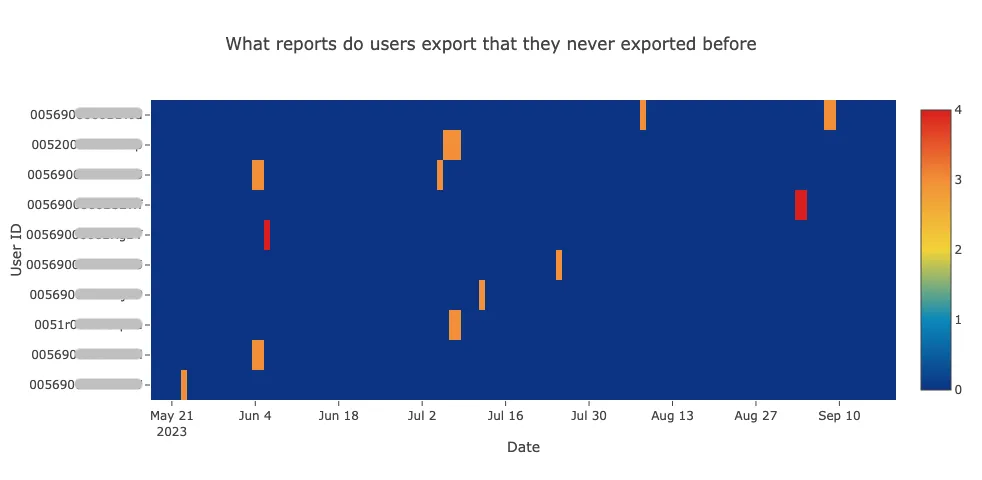
Data visualization can be useful for proactive analysis to help identify rare or anomalous patterns that can inform the development of new detection rules, and for daily monitoring dashboards to quickly spot changes and evolving threats. For example, visualization of Event Monitoring data can help detect deviations from usual behavior, such as Report Export events. A red flag is raised when users export multiple reports they have never accessed before. This heatmap highlights first-time report downloads, revealing hotspots where users are accessing reports at higher volumes. It also shows seasonality— —for example, consistent weekly patterns for certain users, as well as increased report downloads in late August and early September ahead of Q4 and large events.
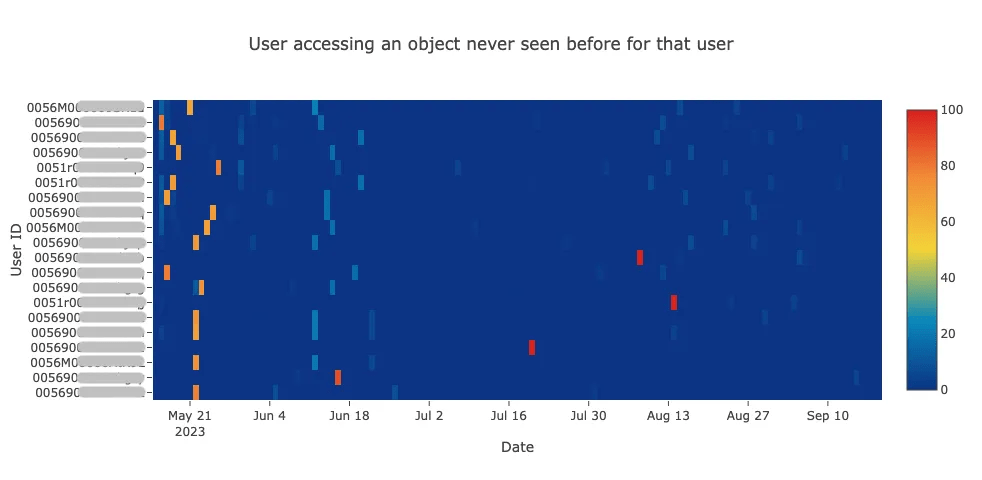
A classic insider threat involves an employee taking large amounts of data shortly before leaving to work for a competitor. This “leaver” pattern often appears as increases to data or objects never previously accessed.
This heatmap shows users accessing objects for the first time, with a potential “leaver” red flag on the right. The earlier period shows more hotspots due to less historical data and some repeated patterns, suggesting seasonality. Over time, activity stabilizes, with most users accessing the same objects.
However, a red hotspot stands out where a user deviates significantly from this pattern, indicating potential risk and warranting further explanation. In contrast, the large area of blue reflects stable, predictable activity from most users during the later time period. When a user suddenly accesses a high number of previously unseen objects, it raises a red flag and can generate automated alerts of anomalous activity. Just a few users have a hotspot in July and August.
Detecting rare or never seen before features can be applied to specific fields, such as user agent. For example, when Emme Martin normally accessed Salesforce, her user agent started with “Mozilla/5.0 (Macintosh; Intel Mac OS X 10_15_7).” When her account was misused by malicious actors, the user agent was different, and had never been seen before. This type of deviation can indicate access from a different device and help confirm potential account compromise.
User Categorization
In the security incident scenario, an obvious sign of suspicious activity was the change of behavior from Emma Martin as a normal user to someone exhibiting higher and broader information access. Using activity logs to automatically classify users based on their behavior — distinguishing between “Normal users,” “Power Users,” “Admins,” and “Integration accounts” — helps detect account compromise and misuse, while enabling more targeted alerting by user type.
Contextualizing user classes:
- Normal Users: Active during business hours; rarely active on weekends.
- Power Users: Higher volume of data consumption than standard normal users.
- System Admins: High levels of ongoing activity, often including weekends.
- Integration Accounts: Predictable, steady stream of activity 24/7.
These charts analyzing events from an operational Salesforce system show that different user types access certain objects more than others and make specific API calls more than others, supporting development of user categorization models.
| Data-oriented behavior categorization | Activity-oriented behavior categorization | |
 |  |  |
| Practitioner’s Tip: User categorization needs to adjust for role changes that cause a user to access Salesforce data differently. Approaches include resetting baselines when roles change or validating behavior against expected role-based patterns. If a user account is being used for dual purposes, such as administration tasks and day-to-day tasks, it can introduce noise into anomaly detection. Integrations often have predictable spikes that can be filtered by using an allowlist, time series analysis, or some other mechanism. |
Time Series Analysis and Cross-log Correlation
Not every spike in activity is a threat. Smart detection models factor in seasonality to reduce false positives. Certain patterns only emerge over months or years. For example, we expect an increase in data activity at the end of every quarter and a significant decrease over weekends. Analyzing long-term logs allows for robust baselining that accounts for “seasonality,” such as end-of-quarter spikes or decreased activity over weekends.
Recent advances in time series analysis can also help improve anomaly detection by better accounting for patterns that repeat over time. Newer machine learning models like Moirai, built by the Salesforce Research team, can recognize temporal patterns at multiple frequencies (e.g. weekly, monthly, annually) and distinguish expected cyclical behavior from true deviations.
Because it uses a transformer-based architecture, Moirai can handle multiple data signals simultaneously—such as list views, data exports, and API calls—allowing it to identify correlations across activities that may not be visible in a single data source. Performing cross-log correlation can also provide a stronger signal for anomaly detection methods, such as increases in rows processed across multiple logs. For example, looking at scope increase across ListView, Report, and API logs for a user account accessing objects outside of usual behavior patterns, provides a stronger anomaly than one behavior in isolation.
| Practitioner’s Tip: Moirai is one option for cross-log correlation and behavioral analysis — any multivariate time series library works here. The approach is what matters: •Import MoiraiForecast and MoiraiModule from uni2ts.model.moirai or another multivariate time series library that fits your purpose. •Align entity names across logs: match QueriedEntities from Report and API logs with DeveloperName from ListView logs. •Pull hourly counts from each event log, e.g., api_call_count, api_row_count, api_object_broadscope_count, report_export_count, report_object_broadscope_count, listview_call_count, listview_broadscope_count. •Combine everything into a single DataFrame per user, one column per metric. •Feed that DataFrame into your model of choice, treating all metrics as a joint multivariate time series. •Generate a forecast distribution per metric to establish each user’s expected baseline. •Compare incoming activity against the forecast — if actual > mean + σ * std: alert(user). |
Another benefit is that Moirai is available pre-trained and ready to use, similar to other out-of-the-box foundational models. This allows teams to treat it as another powerful tool in the toolbox, getting started quickly without the massive resource investment of training a model from scratch.
Making Effective Use of Anomaly Detection
Anomaly detection is a powerful way to find “digital needles” in a massive haystack of event logs, but it must be applied strategically.
Cost Benefit Analysis: Consider whether statistical anomaly detection will produce meaningful results or unnecessary noise. A simple cost benefit analysis can help determine whether a statistical approach is worth the investment, especially when factoring in the effort required to investigate false positives.
False Positive Tolerance: More sensitive anomaly detection with higher false positive rates may be justified when the cost of missing a malicious attack is high. For example, confirmed ListView anomalies that enable you to terminate a session and prevent data from being exfiltrated is a high value, high-impact outcome. A missed data breach can cost millions, whereas investigating a false positive alert costs relatively little.
Actionable Anomalies: It’s also important to have a clear plan for how anomaly detection is used. Define the specific security risk each detection is meant to address and the path to resolution when it triggers. If an anomaly alert isn’t actionable, it’s an obstacle. If you can’t differentiate between someone stealing information and an employee exporting data as part of their job, then alerts on such activities will be too ambiguous to be useful. Opting, when possible, for simpler and explainable models will make it easier to investigate anomaly alerts and identify false positives compared to overly complex, difficult to understand models.
Continuous Improvement: You should also identify likely false positives to determine whether they can be reduced. For example, if seasonal patterns in user behavior aren’t accounted for, teams may spend excessive time investigating expected activity.
The ultimate measure of success for your anomaly detection is the ability to enable an efficient and effective response to genuine threats. As you implement anomaly detection and the threat landscape changes, regularly test your assumptions to ensure they are still valid and deliver valuable results.
Salesforce Event Monitoring is the critical foundation for forensic behavioral analysis and anomaly detection. To dive deeper into the specific log files, event types, and real-time monitoring and response capabilities discussed in this post, explore the Salesforce Log Analysis Guide.
Join an upcoming Security in Action virtual workshop
Learn how to proactively protect your org, and stay current on security tools





