


Important update:
Microsoft Project Online will retire on September 30, 2026. Project for the web, along with Project and Roadmap apps in Microsoft Teams, will transition to Microsoft Planner. If you are evaluating Microsoft Project, consider how these updates may affect long-term use and feature availability.
I’ve used both Microsoft Project and Smartsheet extensively, and while Project excels at complex scheduling and deep Microsoft 365 integration, Smartsheet wins on flexibility and ease of adoption for teams coming from spreadsheets. In this Microsoft Project vs Smartsheet comparison, I’ll break down how they differ across features, pricing, and use cases to help you decide which one fits your team.
- Microsoft Project suits power users who need advanced controls and already work in the Microsoft ecosystem.
- Smartsheet works well for spreadsheet users that need dedicated project management software
Though existing Microsoft customers may feel at home with Microsoft Project, the best choice in terms of pure project management software capabilities is Smartsheet.
Microsoft Project vs Smartsheet compared
| Best for | ||
| Starting price | ||
| Deployment | ||
| Ease of use | ||
| Resource management | ||
| Collaboration tools | ||
| Reporting & dashboards | ||
| Main strengths | ||
Microsoft Project: Better for Microsoft-aligned teams
Use Microsoft Projects if
- you need highly advanced project management software,
- your team comprises power users who aren’t intimidated by the higher learning curve,
- your company is already committed to the Microsoft ecosystem,
- you don’t need integrations with third-party software, or
- you want or need an on-premises deployment option.
Microsoft Project pros and cons
| Pros | Cons |
|---|---|
|
|
For more information, read our full Microsoft Project review and view our list of Microsoft Project alternatives.
Smartsheet: Better for teams with diverse software stacks
Use Smartsheet if
- you want a more cost-effective software platform,
- you are looking for an upgrade from spreadsheets and want a familiar-looking interface,
- you want a lower learning curve than Microsoft Project,
- you need integrations with third-party software, or
- you don’t need on-premises deployment.
Smartsheet pros and cons
| Pros | Cons |
|---|---|
|
|
For more information, read our full Smartsheet review and view our list of Smartsheet alternatives.
Microsoft Project vs Smartsheet pricing
Smartsheet offers lower entry-level pricing and a simpler pricing structure, making it the more accessible option for small teams and growing businesses. Paid plans start at $9 per user per month, with business-tier plans available at $19 per user per month.
Microsoft Project starts at $10 per user per month for basic project management capabilities, but most teams need the Project Plan 3 tier at $30 per user per month to access resource management, reporting, and advanced scheduling tools.
| Plan | Microsoft Project | Smartsheet |
|---|---|---|
| Free plan | Included in Microsoft 365 | ✗ |
| Free trial | 30 days | 30 days |
| Entry plan | Planner Plan 1: $10/user/month | Pro: $9/user/month |
| Mid-tier plan | Planner and Project Plan 3: $30/user/month | Business: $19/user/month |
| Enterprise plan | Microsoft 365 Copilot add-on: $30/user/month | Custom pricing |
If cost is your primary concern, Smartsheet delivers better value for collaborative project management. Microsoft Project justifies its higher price with advanced portfolio management, resource planning, and scheduling features designed for complex projects.
Microsoft Project vs Smartsheet: Feature comparison
Project management
Winner: Smartsheet
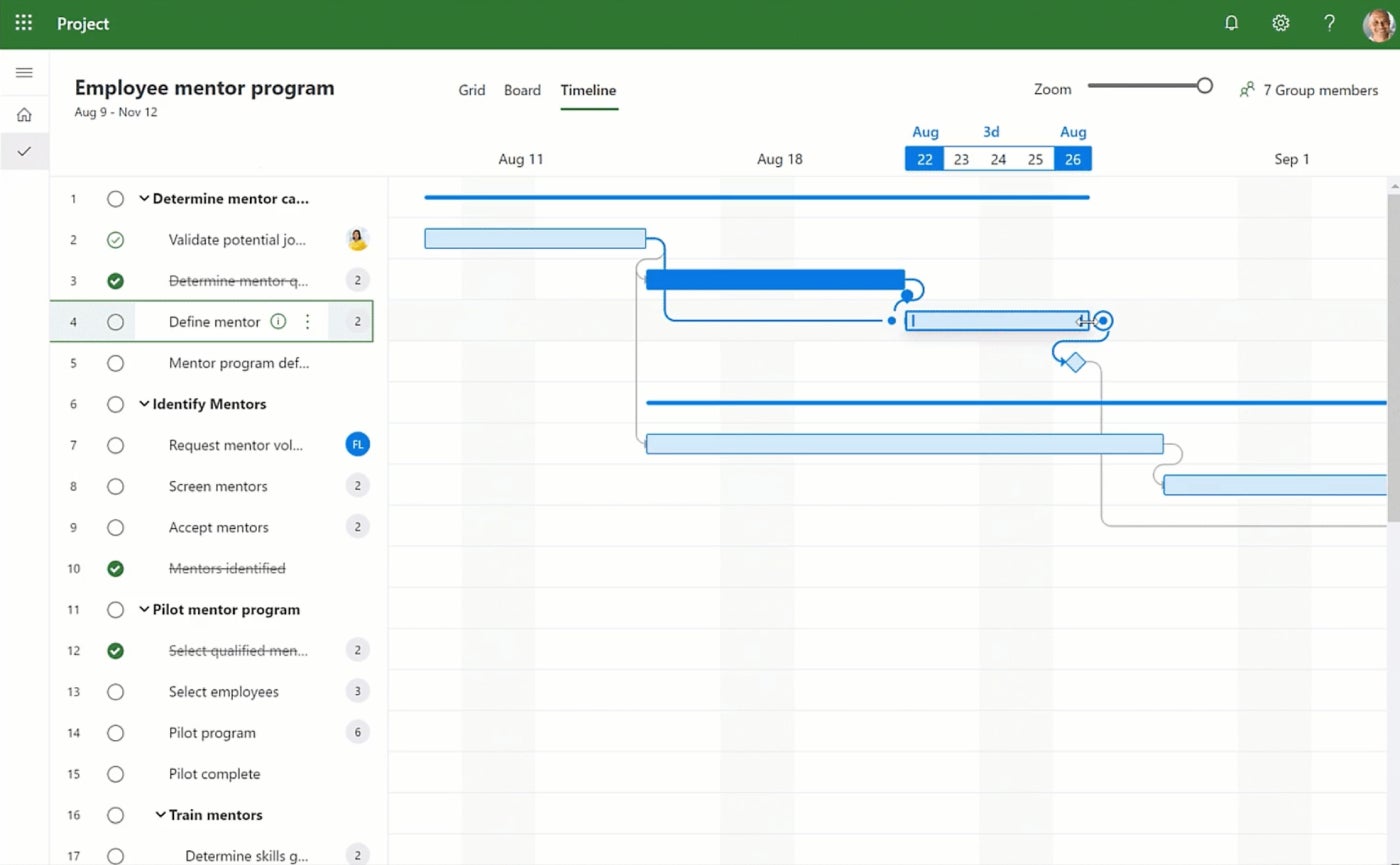
Microsoft Project offers three main project views: grid, board, and timeline (Gantt) view. The design is similar to other Microsoft products, but I didn’t find the interface particularly intuitive to use, and the sheer number of features can be overwhelming and makes it difficult to find what you need.
But what’s impressive about Microsoft Project is that it gives you the option to get very detailed with resource management, such as tracking costs of materials over the course of a project or seeing how much time an individual has spent on a task.
Smartsheet offers four project views: grid, card (kanban), calendar, and Gantt. It’s not the most colorful or appealing interface, but it is easier to navigate than Microsoft Project, in my opinion.
You can either start with a blank sheet or use a template to help guide the process. Conditional formatting rules speed up the process even further, and you can also create automation rules to cut down on manual work. Smartsheet does offer a paid add-on for resource management, but it’s not as robust as Microsoft Project.

Gantt view in Smartsheet shows important details like task status, duration, and team member assigned, reducing the need for extra clicks. With more details displayed, this interface may also be more cluttered for more complex projects.
Document management
Winner: Smartsheet
You can upload documents to a site in Microsoft Project, but editing and updating capabilities are limited because the assumption is that you are already using SharePoint or OneDrive for document storage and management. Microsoft Project also doesn’t integrate with other apps, so you can’t use an outside platform like Google Docs either. This is one of the reasons why Microsoft Project is best used by teams that are already committed to the Microsoft ecosystem.
Smartsheet also allows you to upload files to a project, and it links to multiple popular document management solutions, including Google Drive, Dropbox, and OneDrive. The Business and Enterprise plans offer a proofing feature that allows teams to visually mark up content, including videos, within the Smartsheet tool to keep everything centralized in one place.
If you’re not already using SharePoint or OneDrive, then I would recommend Smartsheet as the better choice for document management.

Communication tools
Winner: Smartsheet
Similar to document management, Microsoft Project does not contain any native features for communication or collaboration. Instead, users will be prompted to connect with colleagues using one of Microsoft’s many other communication tools like Teams, Outlook, or Skype. If you aren’t already part of the Microsoft ecosystem, then you will need to invest in other software that can take over this function — and it won’t integrate with Microsoft Project.
On the other hand, Smartsheet allows teams to have conversations via comments on sheets and rows. Individuals can tag each other in comments to send a notification. Comments can also be accessed via the mobile app so you can read and respond on the go.
While it doesn’t offer a more robust native chat function, Smartsheet does integrate with some messaging platforms, such as Slack, to supplement the built-in comment feature. Unless your team already uses Microsoft’s stack of applications, Smartsheet is the better choice for communication functionality.

Ease of use
Winner: Smartsheet
Smartsheet isn’t the most intuitive project management software I’ve tested, but it was far easier to figure things out compared to Microsoft Project since the layout is more logical. It was also much faster to create and load new projects in Smartsheet, and the larger number of template options helped speed up that process further.

While veteran project managers may appreciate the in-depth view of financials and resource planning in Microsoft Project, less experienced users may struggle with the steep learning curve.
Customer support
Winner: Microsoft Project
On the other hand, Microsoft Project performed a bit better than Smartsheet on the customer service front. The reason for this is that Smartsheet paywalls certain support features (such as 24/7 phone support and a chat bot app) either to the more expensive plans or to a support add-on that costs an additional fee.
Microsoft Project doesn’t charge extra for support, though some users do say that the customer service could be improved.
Integrations
Winner: Smartsheet
When it comes to integrations, Smartsheet beats Microsoft Project by a landslide. Not only does Smartsheet offer 100+ native integrations, it also connects to thousands more platforms through Zapier.
In contrast, Microsoft Project’s native integrations are mostly limited to other Microsoft products, and it doesn’t connect to Zapier (unlike some other Microsoft products), so there isn’t even a workaround.
My methodology
For this Microsoft Project vs Smartsheet comparison, I signed up for free trials in addition to viewing demo videos, consulting project documentation and reading user reviews. I considered features such as task management, portfolio management, document management, and communication tools. I also weighed other factors such as ease of use, customer support, integrations, and pricing.
If neither Microsoft Project nor Smartsheet sounds right for you, don’t worry. There are plenty of other project management solutions out there, including some with forever-free plans. Check out our picks for the top project management software to see what your options are.
More project management coverage
FAQs
What is the main difference between Microsoft Project vs Smartsheet?
The biggest difference is complexity. Microsoft Project focuses on advanced scheduling and enterprise project management, while Smartsheet combines project management with spreadsheet-style collaboration that is easier for most teams to adopt.
Which is easier to use, Microsoft Project or Smartsheet?
Smartsheet is easier to learn because its interface resembles a spreadsheet. Microsoft Project has a steeper learning curve due to its advanced scheduling, resource planning, and portfolio management capabilities.
Is Microsoft Project better than Smartsheet?
It depends on your team’s needs. Microsoft Project excels in enterprise portfolio management. Smartsheet is easier to adopt and integrates with more third-party tools. For teams outside the Microsoft ecosystem, Smartsheet typically offers better value.


