


When evaluating modern point-of-sale (POS) systems in 2025, Clover POS remains a prominent solution for small to midsize businesses looking for a reliable, scalable, and aesthetically sleek setup. However, its pricing model—spanning hardware, software, and payment processing—is often misunderstood. At SaaSworthy, we dissect pricing structures not only for clarity but also to guide SaaS buyers to the best-fit solution for their needs.
In this comprehensive guide, we’ll cover Clover POS pricing in 2025, leveraging SaaSworthy’s independent research and data tracking across thousands of SaaS and POS platforms. We’ll also discuss where Clover excels, where it falls short, and how its costs compare to those of its competitors. But before we dive in, here is our shortlist of top POS Software for 2025:
*{box-sizing:border-box;margin:0;padding:0;font-family:Arial, Helvetica, sans-serif;}
.top__product_list{max-width:715px;margin:0 auto}
.top__product_list .top__product{display:grid;grid-gap:16px;align-items:center;grid-template-columns:auto auto 1fr 150px;min-height:64px;padding:1em 0;border-bottom:1px solid #ccc}
.top__product_list .prd__logo__link{width:64px;height:64px;display:block;border-radius:5px;border:1px solid #e0e0e0;padding:6px}
.top__product_list .prd__logo img{width:100%;height:100%;object-fit:contain;}
.top__product_list .top3__products .prd__rank{background-color:#172e45;border:2px #172e45;color:#fff}
.top__product_list .prd__logo{display:flex;align-items:center;justify-content:center}
.top__product_list .prd__rank{display:flex;align-items:center;justify-content:center;border-radius:5px;border:2px solid #172e45;color:#172e45;font-size:20px;font-weight:600;height:42px;width:40px}
.top__product_list .prd__cta__btn{background-color:#ffbc00;border:1px solid #f4a460;padding:.85em .125em;border:0 solid #172e45;border-radius:5px;color:#111;text-decoration:none;font-size:1em;line-height:1;font-weight:600;text-align:center;transition:all .2s;text-transform:none;flex:1;display:inline-block;}
.top__product_list .prd__cta{display:flex;align-items:center;justify-content:center}
.prd__name{font-size:18px;line-height:24px;margin-bottom:10px}
.top__product_list a{color:#1069C9}
.prd__tagline{font-size:14px;}
.top__product_list .prd__cta__btn:hover{background-color:#9dde17}
.sl-list .prd__name{margin-bottom:0;margin-left: 5px;}
.sl-list .prd__rank_txt{width:20px;font-weight:600;}
.sl-list .top__product{grid-gap:0;border-bottom:0;padding:0;min-height:40px;grid-template-columns:auto auto 1fr;}
.sl-list .prd__tagline{margin-left:5px}
.sl-list .prd__tagline{font-size:15px;}
.sl-list .prd__nme__link:hover{color:#f0493f;}
.sl-list .prd__nme__link{text-decoration:underline;}
.sl-list .prd__name{font-size:16px;}
@media screen and (max-width: 767px) {
.top__product_list .prd__cta{display:none}
.top__product_list .top__product{grid-template-columns: auto auto 1fr;align-items:start;}
.sl-list a{display:inline-block}
.sl-list .top__product{display:block;}
.sl-list .top__product{display:block;min-height:0;padding-bottom:10px}
.top__product_list .prd__rank{height:32px;width:30px;font-size:15px;}
.top__product_list .top__product{grid-gap:8px;}
.top__product_list .prd__logo__link{padding:4px;width:54px;height:54px;}
}
KORONA POS
— Flexible and feature-rich Point of Sale (POS) software designed for retail, QSRs, and ticketing operations.
GoDaddy POS
— Simplify Sales, Streamline Operations, and Elevate Customer Experiences
Lightspeed Retail
— Rediscover Your Business And Potential Chances Of Growth
Overview: What Makes Clover POS Unique?
95
%
SW Score
The SW Score ranks the products within a particular category on a variety of parameters, to provide a definite ranking system. Read more

What is Clover and how does it work?
Clover is a POS (point-of-sale) management system that makes it simple to manage your company, take orders and pay for them. It enables you to organize your inventory and supervise your employees, in order to increase the number of customers you have. Clover’s point-of-sale software is cloud-based, allowing you to view your sales, refunds, deposits, and reports from anywhere. With Clover, you can count and monitor sales at the item level, including discounts, taxes, and more. You can view client birthdays and purchase history, and create profiles with contact information automatically. You can also privately communicate with your consumers and get feedback on their experience. You can customize your point-of-sale system to include the software capabilities you need to operate your company. The platform offers email, SMS, and the Clover app to your consumers to make announcements and send unique promos and marketing campaigns. Individual employee permissions can also be set depending on the structure and responsibilities of your team. Additionally, you can accept payments from your PC, tablet, or smartphone from anywhere with Clover.
Read more
SW Score Breakdown
-
Features
99% -
Reviews
72% -
Momentum
68% -
Popularity
77%
-
Free Trial Available -
Offers Custom plan.
Clover POS, owned by Fiserv, offers an all-in-one ecosystem comprising hardware, software, and merchant services. Unlike more modular POS solutions like Square or Lightspeed, Clover ties all its services tightly together—making it easy to get started, but also raising concerns around flexibility and long-term cost commitments.
At SaaSworthy, we see Clover as a good fit for businesses that want a polished, plug-and-play POS with deep retail or restaurant features—but only if the pricing model works for their transaction volume and contract expectations.
What You’ll Learn in the Guide
In this guide, we break down everything you need to know about Clover POS pricing in 2025, including:
Hardware pricing – Cost of Clover Go, Flex, Mini, Station Solo, and Duo
Software subscription plans – Payments plan, Essentials, Register, and Restaurant-specific options
Payment processing fees – Clover’s direct rates and how they compare to third-party providers
Best plans by business type – Recommendations for retail, restaurants, and mobile businesses
Hidden costs to watch out for – Contracts, leasing traps, early termination fees
Top alternatives to Clover – In case Clover isn’t the right fit for you
Clover Hardware Pricing (2025)
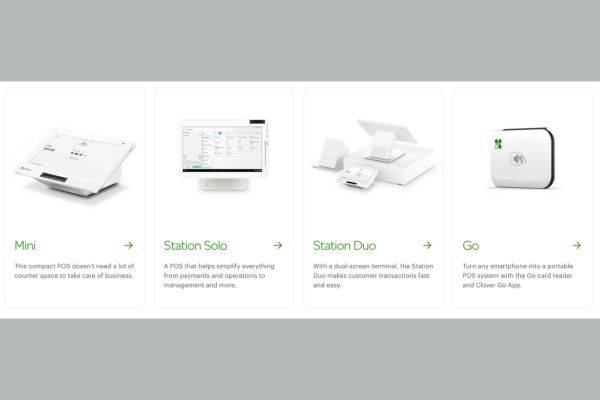
Clover’s hardware is proprietary, meaning you can’t use its software on third-party terminals—a potential downside for businesses switching from another POS system. Here’s what you can expect to pay in 2025 based on MSRP (manufacturer’s suggested retail price):
| Model | Use Case | Price Range | Includes |
|---|---|---|---|
| Clover Go | Mobile card reader | $49 | Basic tap, chip, and swipe support |
| Clover Flex | Handheld device for retail/restaurant | $599 – $649 | Receipt printer, barcode scanner, touchscreen |
| Clover Mini | Compact countertop POS | $799 | Full POS with scanner and printer |
| Clover Station Solo | All-in-one full POS | $1,699 | Large display, printer, cash drawer |
| Clover Station Duo | POS with customer-facing screen | $1,799 | Adds customer display to Solo setup |
SaaSworthy Insight: While hardware pricing is largely consistent through Clover.com, third-party resellers (banks, ISOs, processors) may offer discounted upfront prices—often bundled with long-term contracts or higher processing fees. Always calculate total cost of ownership over 3–5 years, not just initial hardware cost.
Clover Software Plans & Subscription Costs (2025)
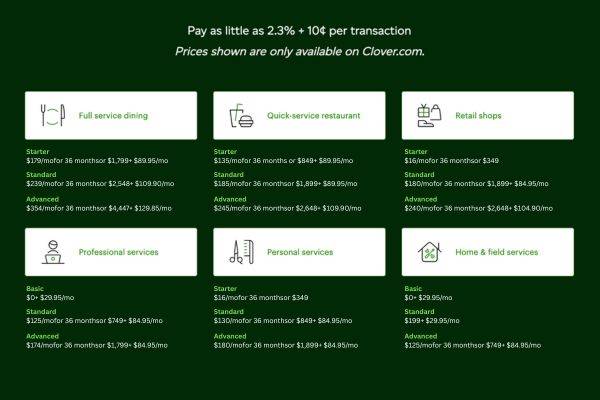
Clover’s software pricing is structured into distinct tiers based on business type and device compatibility. One critical factor: Clover typically locks businesses into 36- or 48-month contracts—a red flag for SaaS buyers accustomed to month-to-month flexibility.
| Plan Name | Monthly Fee | Best For | Key Features |
|---|---|---|---|
| Payments Only | $0/month | Payment processing only | No POS tools, just payment acceptance |
| Essentials | $14.95/month | Service pros, home businesses | Basic POS features, tips, employee permissions |
| Retail Growth | $84.95/month | Full-featured retail | Inventory tracking, loyalty, exchanges/returns |
| Counter Service | $59.95/month | Quick-service restaurants | Online ordering, line-busting, tips, reporting |
| Table Service | $89.95/month | Full-service dining | Floor plans, server-specific tips, QR ordering, bar tabs |
| Virtual Terminal | $14.95/month | Remote/keyed-in payments only | No hardware needed; 3.5% + $0.10 transaction fees |
SaaSworthy Breakdown: While the $0 “Payments Only” plan may seem appealing, it’s extremely limited and lacks reporting, inventory, or employee management tools. For most retail or restaurant operations, expect to pay $59–$90/month per terminal.
Clover Payment Processing Fees
Clover POS doesn’t operate with open integrations to external processors—meaning your payment fees are tied to where you purchase your Clover system. Clover.com offers transparent flat-rate processing, while other vendors may use:
Interchange-plus (ideal for high-volume merchants)
Tiered pricing (often confusing and expensive)
Enhanced billback (worst-case scenario; hard to audit)
Standard Clover.com Processing Rates (2025):
| Transaction Type | Essentials Plan | Retail/Restaurant Plans |
|---|---|---|
| In-person (Card Present) | 2.6% + $0.10 | 2.3% + $0.10 |
| Online / Virtual Terminal | 3.5% + $0.10 | 3.5% + $0.10 |
SaaSworthy Tip: If your business processes more than $10,000/month, negotiate interchange-plus pricing through resellers like Payment Depot, Dharma Merchant Services, or National Processing. The savings can be substantial compared to flat-rate fees.
Clover POS Pricing Examples: Total Cost Analysis
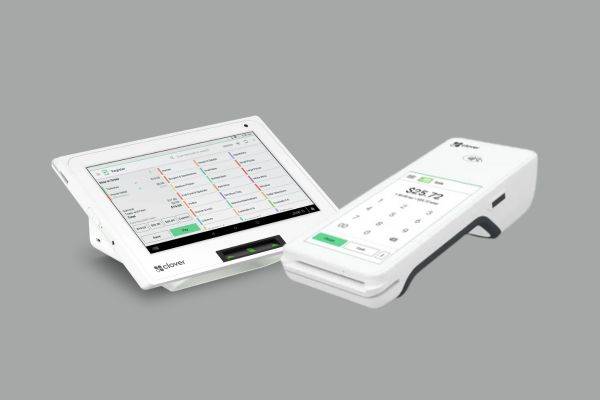
Let’s evaluate total costs based on real-world use cases, including hardware, software, and processing fees.
Retail Shop with Clover Mini
Hardware: $799 (outright purchase)
Software: $84.95/month (Retail Growth)
Processing Volume: $20,000/month (avg. ticket $50)
Processing Fees: 2.3% + $0.10 = ~$490/month
Estimated Monthly Cost:
$84.95 (software) + $490 (processing) = $574.95/month
Quick-Service Café with Clover Flex
Hardware: $649
Software: $59.95/month (Counter Service)
Processing Volume: $10,000/month (avg. ticket $15)
Processing Fees: 2.3% + $0.10 = ~$255/month
Estimated Monthly Cost:
$59.95 + $255 = $314.95/month
Best Clover POS Plans by Business Type

Choosing the right Clover POS plan depends heavily on your business model. Here’s how Clover’s offerings stack up across retail, restaurant, and mobile operations in 2025.
For Retail Stores
Recommended Plan: Retail Growth Plan ($84.95/month)
Hardware: Clover Mini or Clover Station Solo/Duo
Why it works:
Advanced inventory tracking with modifiers and item variants
Barcode scanner and scale integrations
Employee permissions and shift scheduling
Built-in customer loyalty tools
Sales reporting by category, item, and channel
Best For: Clothing boutiques, hardware stores, health & beauty retailers, electronics shops
For Full-Service or Counter-Service Restaurants
Recommended Plans:
Table Service Restaurant Plan ($89.95/month) for dine-in establishments
Counter Service Plan ($59.95/month) for fast casual & QSR
Hardware: Clover Station Duo or Clover Flex (for line-busting and table-side orders)
Why it works:
Floor planning, tab pre-auths, and tipping
Order splitting and service charge configuration
Contactless ordering (QR-based) and online ordering tools
Grubhub and Google ordering integrations
Revenue center reporting (bar vs. dining room, etc.)
Best For: Full-service restaurants, cafes, quick-service eateries, bars, food trucks (with Clover Flex)
For Mobile or Field Service Businesses
Recommended Plan: Essentials Plan ($14.95/month) or Payments Plan ($0/month)
Hardware: Clover Go (mobile reader) or Clover Flex
Why it works:
Take card payments on the go via smartphone or tablet
Accept NFC (Google Pay, Apple Pay), chip, and swipe
Offline payment acceptance for poor network zones
Virtual terminal for phone or email orders
Invoicing and basic reporting
Best For: Delivery services, freelancers, consultants, personal care pros, market vendors
Hidden Costs to Watch Out For
While Clover offers a sleek, capable POS platform, it’s easy to get tripped up by hidden costs depending on where and how you buy your system. Here’s what to watch for:
Contract Lengths
Most vendors require 36–48-month contracts on software. Canceling early? You may owe the full remaining value of your contract. Always read the fine print before signing.
Leasing Traps
Some resellers offer “free” hardware — but it’s actually being leased, locking you into non-cancellable hardware contracts that can cost thousands over time. Always opt to buy hardware upfront if possible.
Processing Fee Markups
Not all Clover vendors offer the same rates. Some use:
Tiered pricing (unpredictable and often higher)
Enhanced billback (complex and expensive)
Non-transparent markups on flat rates
Stick with flat-rate or interchange-plus pricing models from trusted resellers like Dharma, Payment Depot, or National Processing.
Setup, Support & Early Termination Fees
Ask about:
Setup charges (some vendors sneak in $100+ fees)
Tech support costs (some offer 24/7 for free, others charge)
Early termination fees on both software and processing agreements
Top Alternatives to Clover POS (2025 Picks)
| Feature / POS System | Clover POS | Square POS | Lightspeed POS | Toast POS | Revel Systems |
|---|---|---|---|---|---|
| Best For | Retail, restaurants, mobile | Startups, food trucks, salons | Advanced retail, multi-location | Full-service & QSR restaurants | Enterprise/multi-unit chains |
| Pricing (Software) | $0–$89.95/month per device | $0–$60/month | $89–$199/month | $0+ (requires processing) | ~$99+/month (custom) |
| Hardware | Proprietary (Flex, Mini, etc.) | Free reader; iPad/registers | iPad-based kits | Proprietary Android hardware | iPad + compatible peripherals |
| Payment Processing | Clover Payments (Fiserv) only | Square only | Lightspeed or 3rd party | Toast Payments only | Custom processor choice |
| Contract Commitment | 36+ months (via many resellers) | Month-to-month | Annual plans, cancel anytime | Contract + termination fees | Annual or custom agreements |
| Offline Mode | Yes (Flex & Mini supported) | Yes | Yes | Yes | Yes |
| Inventory Management | Moderate to Advanced | Basic to Moderate | Advanced (multi-store & matrix) | Moderate | Advanced |
| Restaurant Features | Floor plans, tipping, modifiers | Basic (3rd-party for full use) | Add-ons only | Industry-leading tools | Available via add-ons |
| Mobile Readiness | Clover Go / Flex | Square Reader / Terminal | iPad with LTE (optional) | Toast Go 2 (handheld device) | Mobile iPad setups supported |
| Notable Downsides | Leasing traps, limited resellers | Limited for full-service dining | Higher learning curve & cost | Locked-in processing, fees | Higher upfront cost |
If Clover’s pricing or contract structure doesn’t work for you, here are the top expert-recommended POS alternatives from the SaaSworthy editorial team:
Square POS (Best Free All-In-One POS)
95
%
SW Score
The SW Score ranks the products within a particular category on a variety of parameters, to provide a definite ranking system. Read more

What is Square Point of Sale and how does it work?
Square POS is an advanced mobile point of sale processing solution that helps businesses make POS transactions effortlessly. The software’s major selling point is its ease of use, which allows you to easily keep track of customers’ purchase details automatically, send digital receipts and receive feedback to help boost customer service. It also takes a detailed inventory of stocks and uses generated sales report to help make better informed decisions. Square provides the necessary hardware for point of sale service and it even gives the ability to transform mobile devices to a POS device. Square Terminal lets you all accept payments of all types without the need of unnecessary hardware. All these features can be managed via the Square Dashboard with a simplified view. Square also has an integrated payment processing system that allows acceptance of cash, cards, checks and gift cards with its POS software. Square POS is free to use, except for the charges based on the type of Square software used.
Read more
SW Score Breakdown
-
Features
100% -
Reviews
85% -
Momentum
65% -
Popularity
68%
-
Free Trial Not Available -
Starts at $29.0. Offers Free-forever and Custom plan.
Hardware: Free reader, affordable register kits
Software: $0/month for basic POS
Processing Fees: 2.6% + $0.10 (in-person), no monthly contracts
Best For: Small retail, food trucks, service-based businesses
Why We Like It: No contracts, transparent pricing, rich feature set even on free tier
Lightspeed RetailPOS (Best for Advanced Retail Needs)
95
%
SW Score
The SW Score ranks the products within a particular category on a variety of parameters, to provide a definite ranking system. Read more

What is Lightspeed Retail and how does it work?
Lightspeed Retail is a POS software that offers advanced eCom solutions, omnichannel loyalty and contactless payments. With one click and one platform, Lightspeed Retail can sync the physical inventory across all locations to the eCom store. This POS software further improves a company’s stock from every location and organises the shipments from its eCom back office. A company can easily set up its eCom store with Lightspeed Retail’s mobile-responsive and customisable templates backed by quick inventory sync. Furthermore, the automatic confirmation and reminder emails of this software reduce no-shows. Lightspeed Retail also helps businesses to reach out to the nearby stores searching for products online with Google local inventory ads. One can even leverage ad campaign results to stay on top of changing customer tastes by using this POS software. Lightspeed retail further provides omnichannel gift card management services that help customers to purchase and redeem the same gifts in-store and online. Furthermore, this software is a fully integrated way to discover workflows more efficiently than ever.
Read more
SW Score Breakdown
-
Features
92% -
Reviews
85% -
Momentum
69% -
Popularity
68%
-
Free Trial Available -
Starts at $89.0.
Hardware: iPad-based or proprietary kits
Software: Starts at $89/month
Processing: Flat-rate or third-party options
Best For: Multi-location retailers, inventory-heavy stores
Why We Like It: Powerful inventory tools, eCommerce features, loyalty programs
Toast POS (Best for Restaurants)
95
%
SW Score
The SW Score ranks the products within a particular category on a variety of parameters, to provide a definite ranking system. Read more

What is Toast and how does it work?
Toast is a customizable POS system designed for restaurants. It helps restaurants to provide better service, improve the way they run operations, and increase revenue. The solution brings together online ordering, digital and physical loyalty and gift cards, and workforce management tools. Toast enables you restaurant to offer tableside ordering and payments, as well as offer digital receipts, which can also help you grow your marketing list. This includes the ability to also print, email or send these receipts by text message, as well as being able to join the restaurant loyalty program. Toast handheld devices can also suggest suitable tip options to customers. Toast provides hardwired terminals that also work offline, as well as a flat rate for processing all payments and transactions. Toast’s functionality extends to the creation of real-time reports, which help you monitor your restaurant’s performance, even remotely. You can also make updates to your menu across all devices and POS terminals at once.
Read more
SW Score Breakdown
-
Features
96% -
Reviews
92% -
Momentum
73% -
Popularity
97%
-
Free Trial Not Available -
Starts at $75.00. Offers Free-forever plan.
Hardware: Android-based proprietary gear
Software: Starts at $0/month (with commitment), advanced tiers available
Processing: Must use Toast Payments (custom rates)
Best For: Quick-serve, full-service restaurants, and chains
Why We Like It: Restaurant-specific features, strong reporting, and KDS integrations
Revel Systems (Best for Custom Enterprise Setups)
What is Revel Systems and how does it work?
Revel Systems is a point-of-sale system and business management platform that optimizes your company operations, from inventory management to online purchasing and customer relationship management to provide you exceptional results. The platform offers a stylish, easy-to-use iPad POS that simplifies and speeds up the management and transaction process of your business. With Revel, you can make use of the iPad’s familiar interface for fast and straightforward staff training. You can enhance order accuracy, promote efficiency, and install a Customer Display System (CDS) to keep lines moving. Revel’s central management panel allows you to control one or several locations from anywhere at any time. It offers real-time reporting that allows you to keep track of, evaluate, and make choices on your most valuable assets. With thorough insights on your personnel, inventory, and peak business hours, you can save money and decrease waste using Revel. With an on-screen split of station-specific prep activities, you can streamline your production process. From payment processing to loyalty programs and more, Revel’s extensive platform enables you to integrate the features and connections you want.
Read more
-
Free Trial Not Available
Hardware: iPad + third-party integrations
Software: Custom pricing, typically $99+/month per terminal
Processing: Choose your own provider
Best For: Growing multi-location businesses
Why We Like It: Flexible, scalable, and highly customizable
Clover POS vs Alternatives: SaaSworthy’s Competitive Take
While Clover provides strong hardware-software integration, its lack of flexibility, expensive long-term contracts, and opaque reseller ecosystem hurt its competitiveness in 2025.
Clover vs Square
Square is more transparent and flexible but less customizable.
Clover offers more robust restaurant features out of the box.
Clover vs Lightspeed
Lightspeed is better for retail scaling and eCommerce sync.
Clover has easier hardware setup and is more user-friendly.
Final Verdict: Is Clover Worth the Price in 2025?
From SaaSworthy’s vantage point, Clover POS is a viable solution—but only under the right pricing structure. If you’re locked into a 4-year lease or forced into tiered pricing, your costs will far exceed the value.
Choose Clover If:
You want a sleek, all-in-one POS terminal.
Your business is primarily in-person (retail, restaurant).
You work with a trusted Clover reseller offering interchange-plus or flat rates with no contract.
Avoid Clover If:
You want to use third-party payment processors.
You prefer monthly SaaS billing and flexible contracts.
You rely heavily on online/remote payments (due to 3.5% fees).
Clover POS Pricing Summary (2025)
| Component | Estimated Cost |
|---|---|
| Hardware | $49 – $1,799 |
| Software (monthly) | $0 – $89.95/month |
| Processing Fees | 2.3% – 3.5% + $0.10/txn |
| Contract Terms | 36–48 months (or month-to-month via some resellers) |
Pro Tip from SaaSworthy:
Before signing any Clover agreement, ask for full contract terms in writing, verify processing rate structure, and calculate total costs over 3 years. The devil is in the fine print.
Interested in more POS pricing comparisons or SaaS reviews?
Follow SaaSworthy for expert breakdowns, side-by-side analysis, and dynamic scoring on top POS systems including Square, Lightspeed, Toast, and more.
Clover POS Pricing FAQs (2025)
What are the best Clover POS software?
*{box-sizing:border-box;margin:0;padding:0;font-family:Arial, Helvetica, sans-serif;}
.top__product_list{max-width:715px;margin:0 auto}
.top__product_list .top__product{display:grid;grid-gap:16px;align-items:center;grid-template-columns:auto auto 1fr 150px;min-height:64px;padding:1em 0;border-bottom:1px solid #ccc}
.top__product_list .prd__logo__link{width:64px;height:64px;display:block;border-radius:5px;border:1px solid #e0e0e0;padding:6px}
.top__product_list .prd__logo img{width:100%;height:100%;object-fit:contain;}
.top__product_list .top3__products .prd__rank{background-color:#172e45;border:2px #172e45;color:#fff}
.top__product_list .prd__logo{display:flex;align-items:center;justify-content:center}
.top__product_list .prd__rank{display:flex;align-items:center;justify-content:center;border-radius:5px;border:2px solid #172e45;color:#172e45;font-size:20px;font-weight:600;height:42px;width:40px}
.top__product_list .prd__cta__btn{background-color:#ffbc00;border:1px solid #f4a460;padding:.85em .125em;border:0 solid #172e45;border-radius:5px;color:#111;text-decoration:none;font-size:1em;line-height:1;font-weight:600;text-align:center;transition:all .2s;text-transform:none;flex:1;display:inline-block;}
.top__product_list .prd__cta{display:flex;align-items:center;justify-content:center}
.prd__name{font-size:18px;line-height:24px;margin-bottom:10px}
.top__product_list a{color:#1069C9}
.prd__tagline{font-size:14px;}
.top__product_list .prd__cta__btn:hover{background-color:#9dde17}
.sl-list .prd__name{margin-bottom:0;margin-left: 5px;}
.sl-list .prd__rank_txt{width:20px;font-weight:600;}
.sl-list .top__product{grid-gap:0;border-bottom:0;padding:0;min-height:40px;grid-template-columns:auto auto 1fr;}
.sl-list .prd__tagline{margin-left:5px}
.sl-list .prd__tagline{font-size:15px;}
.sl-list .prd__nme__link:hover{color:#f0493f;}
.sl-list .prd__nme__link{text-decoration:underline;}
.sl-list .prd__name{font-size:16px;}
@media screen and (max-width: 767px) {
.top__product_list .prd__cta{display:none}
.top__product_list .top__product{grid-template-columns: auto auto 1fr;align-items:start;}
.sl-list a{display:inline-block}
.sl-list .top__product{display:block;}
.sl-list .top__product{display:block;min-height:0;padding-bottom:10px}
.top__product_list .prd__rank{height:32px;width:30px;font-size:15px;}
.top__product_list .top__product{grid-gap:8px;}
.top__product_list .prd__logo__link{padding:4px;width:54px;height:54px;}
}

KORONA POS

GoDaddy POS

Lightspeed Retail


How much does Clover POS cost in 2025?
Clover POS pricing varies based on three main components:
Hardware: $49 (Clover Go) to $1,799 (Clover Station Duo)
Software subscription: $0 to $89.95/month
Payment processing: 2.3%–2.6% + $0.10 per card-present transaction; 3.5% + $0.10 for card-not-present
SaaSworthy recommends purchasing hardware outright and opting for a provider that offers transparent, flat-rate or interchange-plus processing to avoid overpaying.
Is there a free version of Clover POS?
Yes — Clover offers a “Payments” plan for $0/month. However, it only supports basic payment processing with no POS features (e.g., inventory or employee management). SaaSworthy considers this more of a mobile processing solution than a true POS.
What’s the best Clover POS plan for restaurants?
For quick-service restaurants, the Counter Service Plan ($59.95/month) is ideal.
For full-service dining, the Table Service Plan ($89.95/month) includes advanced features like:
Floor planning
Tip management
Split checks
QR code ordering
These plans integrate well with Clover Station Solo, Duo, and Flex devices.
Does Clover require a contract?
Yes. If you purchase directly from Clover, you’re usually required to sign a 36-month or 48-month contract. Early termination fees apply. However, SaaSworthy strongly recommends using trusted third-party vendors that offer month-to-month contracts with no cancellation penalties.
Are there hidden fees with Clover POS?
Clover’s own pricing is fairly transparent, but some resellers bundle Clover with high-fee processing contracts, long-term hardware leases, or unclear pricing models (e.g., tiered pricing). SaaSworthy warns against:
Leasing hardware (buy instead)
Tiered or “enhanced billback” pricing models
Early termination penalties
Always verify the full contract terms before signing.
Can I use Clover POS with my own payment processor?
No. Clover POS is tied to the payment processor you buy it from. This means if you buy from Clover.com, you’re locked into their processor (Fiserv). However, if you purchase from a reseller like Dharma Merchant Services or Payment Depot, you can get better processing rates.
Is Clover POS good for high-volume businesses?
Yes, especially if you negotiate interchange-plus pricing through a trusted vendor. Clover is robust enough for:
Multi-location retailers
Busy quick-service restaurants
Growing hospitality businesses
High-volume businesses may also qualify for custom rates through Clover’s “rate review” process after six months of processing.
Can I add multiple registers or devices?
Yes. You can add additional Clover devices to the same account. Each extra register will incur an additional $14.95/month/device for software licensing.
What hardware is included with Clover POS?
Here’s what to expect:
Clover Station Solo/Duo: Cash drawer, receipt printer, and barcode scanner
Clover Mini: Compact terminal with built-in printer (cash drawer optional)
Clover Flex: Portable smart terminal with printer and scanner
Clover Go: Mobile card reader with app (requires a smartphone)
All hardware must be Clover-branded — third-party hardware isn’t compatible.
What’s the best alternative to Clover POS?
According to SaaSworthy analysis, top alternatives include:
Square POS: Free plan, transparent pricing, great for micro-businesses
Lightspeed Retail or Restaurant: Feature-rich, scalable, great support
Toast POS: Tailored for restaurants, with advanced hardware integration
These may offer better pricing flexibility or software capabilities depending on your industry.
The post Clover POS Pricing in 2025: Hardware, Software & Subscription Cost appeared first on SaaSworthy Blog | Top Software, Statistics, Insights, Reviews & Trends in SaaS.


