


If you’re considering POS software in 2026, there’s more to the price tag than just monthly fees. The real cost stacks up: software subscriptions, payment processing, hardware, integrations, and all the extra add-ons that come with actually running your store.
KORONA POS pitches itself as one of the more transparent options. What’s refreshing is that you can pick your own payment processor and negotiate rates. That’s a stark contrast to POS systems that force you into their payment processing contracts. Here’s a straight breakdown of what you get, what you pay, and how it stacks up against Square POS, Lightspeed Retail, and Shopify POS.
Quick Breakdown
- Starting Price: $59 per terminal each month for the Core plan. Higher tiers go up to about $99, all depending on features.
- How It Works: You pay for each terminal on a subscription. You can add modules as you go.
- Payment Processing: You call the shots, choose your own processor. No lock-ins.
- Real Monthly Cost: Hardware is a one-time fee. The average software fee is $79/mo per terminal.
- Best For: Stores with a ton of inventory or multiple locations, liquor, convenience, vape shops, and specialty retail stores.
KORONA POS Pricing: The Basics
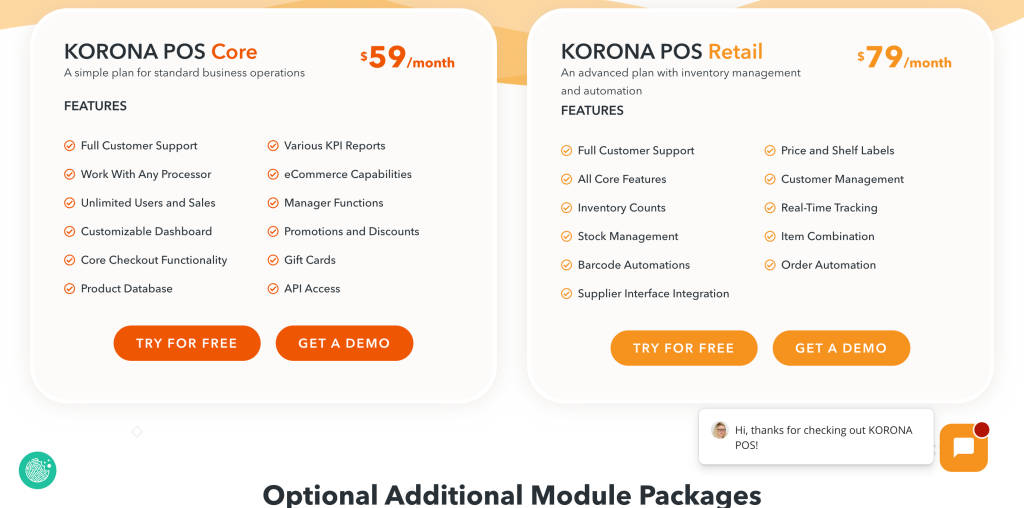
KORONA POS pricing runs on a subscription model. You pay per terminal each month. It’s designed so there aren’t surprises, and to give you the flexibility to add more terminals or features as you need, all month-to-month. You can scale up or down without worrying about being locked in.
With KORONA POS, you get:
- One price per terminal each month
- No long-term contracts, cancel or switch whenever
- Unlimited users and unlimited transactions
- Modular add-ons for industries like food, ticketing, and franchises
- Freedom to choose your own payment processor
- 24/7 customer support
KORONA POS doesn’t lump software and payment processing together. That means you choose your own payment processor, and you might score a better deal.
Snapshot of KORONA POS Pricing Plans
| Plan | Monthly Price (Per Terminal) | Best For |
| Core | $59 | Small stores |
| Retail | $79 | Inventory-heavy retail |
| Plus | $99 | Analytics, multi-location, integrations |
| Enterprise | Custom | Larger chains |
Prices shift depending on which add-ons or integrations you pick and how many terminals you’ve got.
Breakdown of Each Plan
Each plan is built for a different kind of retailer. The more advanced you go, the more inventory, reporting, and integrations you get.
Core Plan $59/month/terminal
This is for smaller stores. You get basic checkout, product catalogue management, sales reports, discount tools, customer management, eCommerce capability, unlimited users/transactions, and 24/7 support. For gift shops, convenience stores, boutiques, or single-location retailers, this covers the essentials.
Retail Plan $79/month/terminal
For stores managing bigger catalogues. This plan adds advanced inventory management, real-time stock tracking, multi-store features, API access, manager-level reporting, and inventory optimization. Great for liquor stores, vape/tobacco shops, convenience and speciality stores with lots of products.
Plus Plan $99/month/terminal
Built for bigger operations needing robust analytics. You get advanced dashboards, multi-location analytics, deeper API integrations, business intelligence insights, and operational monitoring. Franchise stores, brands with multiple locations, are in this league.
Enterprise Plan Custom Pricing
For full-scale chains needing custom integrations, infrastructure, franchise reporting, advanced dashboards, and tailored onboarding/training. Price depends on how many stores, terminals, and integrations you need.
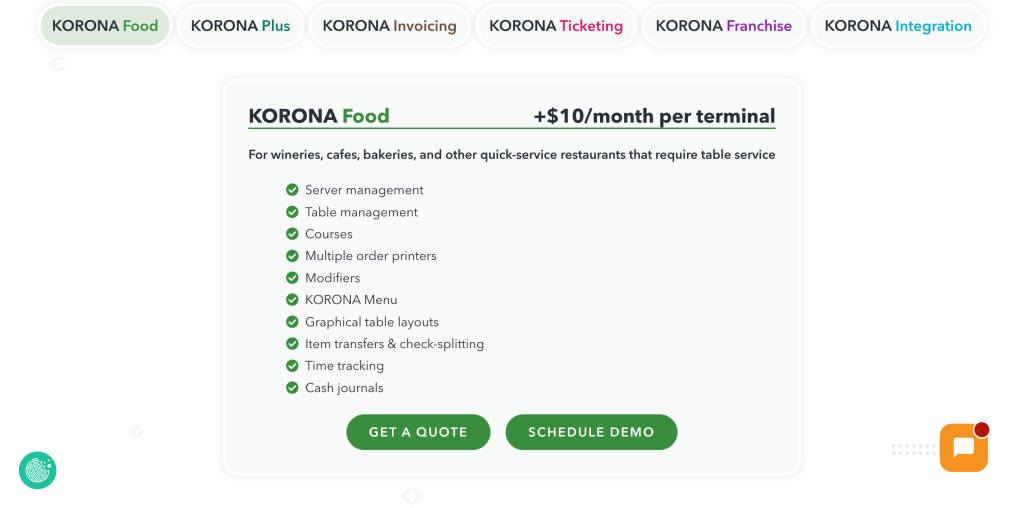
Add-ons & Modules
You can bolt on extra features if needed:
- KORONA Food: $10 per terminal
- KORONA Invoicing: $10 per terminal
- KORONA Plus module: $20 per terminal
- KORONA Franchise: $30 per franchise
- KORONA Integration: $45 per token
- KORONA Ticketing: $50 per gate
These are optional; only pay for what you need.
Hardware Costs
You buy hardware separately. Typical setup includes:
- POS terminal or tablet ($400-$700)
- Barcode scanner ($100-$300)
- Receipt printer ($150-$400)
- Full POS terminal ($800-$2,500)
- Cash drawer, customer display, payment terminal
The average retailer will spend $800-$3,500 per register for hardware. Final price depends on whether you buy outright or lease the equipment and whether it’s new or used.
Payment Processing Fees
Here’s where KORONA POS stands out: you choose your own processor, which means you can negotiate rates.
Common fees:
- Card processing: 2.2% to 3.5%
- Per transaction: $0.10 to $0.30
If you run a high-volume store, negotiating can lower your costs quite a bit. Merchants can also set up cash discounting or dual pricing if they wish to pass the processing costs on to the consumer.
Your Real Monthly Cost
Let’s say you operate a small retail store with:
- 2 POS terminals
- ~$20,000 in monthly sales
- Average payment processing fee: 2.5% – 3%
Cost Breakdown:
- Software: $59/month (base plan for 1–2 terminals)
- Payment processing: $500 to $600/month (2.5%–3% of $20,000 in sales)
- Hardware amortization: $40/month (spread across 2 terminals)
- Optional modules: $10 to $50/month (inventory, loyalty, etc.)
Total: $609 to $749 per month, per location
Key Insight:
Payment processing is directly tied to your revenue. As your sales grow, this becomes the largest and most variable cost component.
KORONA POS vs. Square, Lightspeed, Shopify
| POS System | Monthly Software | Payment Processing | Best For |
| KORONA POS | $59 to $99 | Choose your processor | Inventory-heavy stores |
| Square POS | Free to $149+ per month | Square Payments | Small businesses |
| Lightspeed Retail | $109+ | Lightspeed Payments | Retail and restaurant chains |
| Shopify POS | $39 to $2000 | Shopify Payments | Online + brick-and -mortar retailers |
What’s Different?
- Square POS: Easy, fast onboarding, made for new/small businesses.
- Shopify POS: Designed for stores that sell online and in person.
- Lightspeed Retail: Advanced analytics, multi-store support.
- KORONA POS: Deep inventory control, payment processor flexibility.
How SaaSworthy Views KORONA POS
Three things that make KORONA POS stand out are:
- Processor flexibility: Unlike most POS companies that make money off payment processing, KORONA POS lets you pick your processor.
- Inventory focus: Perfect for stores with complicated inventory, liquor, vape, and grocery.
- Predictable pricing: Reporting, analytics, support, they’re mostly included, so you’re not nickel-and-dimed.
But honestly, it can be harder for new retailers to jump in. Square wins for sheer simplicity and quick setup. KORONA POS shines when your store has grown, and you need to keep tight inventory and operational control.
What Retail Owners Say on Reddit
Store owners on Reddit often compare KORONA POS, Square POS, and Lightspeed Retail, especially when juggling lots of inventory and wanting processor freedom.
One retailer said, “KORONA POS is great if you have a large inventory. It handles stock much better than simpler POS systems.” Another pointed out, “Not being locked into a processor is a huge benefit. That flexibility can save a lot over time.” A few also mention that KORONA POS takes a bit longer to learn than Square.
Overall, Reddit folks see KORONA POS as strong and reliable for established stores. Smaller shops and pop-ups often stick with lighter, simpler POS options.
Is KORONA POS Right for Small Retailers?
It works really well if you run liquor stores, vape shops, groceries, or specialty stores or have multiple locations.
Why Choose KORONA POS
- Transparent pricing
- Powerful inventory tools
- Freedom with payment processing
- 24/7 support
What’s less ideal:
- Costs more upfront than Square POS
- Hardware isn’t included
- Takes a bit more time to learn
If you manage lots of products or locations, KORONA’s advanced tools are a real advantage.
The SaaSworthy Take
KORONA POS’s open pricing and processor flexibility offer more control than you get with most POS platforms, where you’re often hit with hidden fees or required to bundle hardware and processing in long-term contracts.
That model is genuinely valuable for high-volume stores, which pay the most for processing. But for newcomers or smaller operations, Square POS makes it easier and cheaper to get started. KORONA POS draws folks who need serious inventory management and reporting, those scaling up and wanting control.
Bottom line: KORONA POS delivers operational depth for retailers who need more than just a basic checkout system.
FAQs
How much does KORONA POS cost per month?
Starts at $59 per terminal for the Core plan, goes up to about $99 for advanced plans.
Does KORONA POS charge transaction fees?
No, KORONA POS doesn’t add transaction fees. Your payment processor sets those rates.
Is there a free trial?
Yes, test it out before you commit.
Do I need a contract?
No. KORONA POS is month-to-month.
Can KORONA POS integrate with eCommerce?
Yes. It supports integrations and eCommerce.
Who should use KORONA POS?
Retailers with large inventories or multiple locations need strong inventory management.
The post KORONA POS Pricing Explained (2026): Plans, Real Costs, Hardware & Fees appeared first on SaaSworthy Blog | Top Software, Statistics, Insights, Reviews & Trends in SaaS.


