While an architect’s verbal communication is essential for conveying their message and bringing business and technology stakeholders together, it is rarely sufficient on its own. Some concepts are too complex to simply talk through, while others have nuances that are too subtle or sensitive to state outright.
Successful architects weave nonverbal communication into their narrative seamlessly. It allows them to transform dense technical information into a compelling, intuitive vision that inspires understanding and approval among stakeholders.
In part one of this “Talk Like An Architect” blog mini-series, we established the architect as the “bridge” between the business and technology pillars and deconstructed the building blocks of communication. We explored how verbal storytelling helps keep an audience engaged and how anchoring your message to stakeholder needs helps build shared understanding.
But as any seasoned architect knows, to talk like an architect, what you say is only half the battle. To truly lead, you must master the nonverbal elements of communication: the visuals you build and the presence you project.
Beyond words: the nonverbal spectrum
Nonverbal communication is a broad spectrum of signals, ranging from structured and intentional visuals with a clear message in mind, to subtle signals which are open to interpretations.
For the purpose of this blog, we’ll break it down into two categories:
- Visual communication includes elements like diagrams which are purposefully created or included by architects to strengthen the narrative conveyed through verbal communication.
- Nonverbal communication includes gestures, facial expressions, body language and other aspects of how architects may present themselves. These signals may be expressed intentionally or unintentionally and can enforce or detract from the message being conveyed.
With these forms of nonverbal communication in mind, let’s take a closer look at visual communication and how architects use it to support their narrative.
How to Build Salesforce Diagrams
Diagrams are an essential tool and a key part of architectural work. They enable us to communicate many different ideas to many different kinds of stakeholders.



One picture, a thousand words: visual communication
Visual communication can be incredibly versatile. It can be a diagram, taking center stage in your narrative to help walk your audience through a complex concept or structure. It can also be a stock photo of a happy group of users to support your story by visualizing a sentiment or desired outcome.
Regardless of the role it’s playing, you need to be aware of the power a visual has in drawing the audience’s attention. Make sure it delivers the desired effect without adding unnecessary distractions. Choose your visual with care and intention.
A random picture of a cat might be perfect to lighten the mood in a community presentation, but might seriously confuse or alienate your C-level audience during a steering committee.

Equally confusing would be diagrams lacking visual consistency. If you’re using blue boxes in your data model to denote Leads and Accounts as standard Salesforce objects, don’t use a green box to represent your standard Opportunity. It will distract your audience and cause unnecessary confusion.
Sometimes, your visual is meant to draw focus. We all know that “a picture paints a thousand words” and in terms of information density, it’s tough to beat a well-thought out visual. Imagine trying to talk your way through a data model. It would take a lot of words, a lot of time and would likely still leave your audience confused.
However, even with a data model diagram on display, how and when you use it still matters. As you plan your narrative, consider the following:
- When you introduce your diagram: Keep your storyline in mind and choose the introduction of your visual carefully. If you’re explaining the challenge, showing a diagram demonstrating your solution will be a distraction and undermine your narrative. Showing your skills management data model while you’re still explaining your stakeholder’s challenge in scheduling the right resource for the right task will cause your verbal and visual communication to become disconnected, distracting and confusing.
- What you show: If your picture is busy and crowded, it will still confuse rather than inform. Show what is relevant rather than overwhelming your audience with unnecessary information. Our example data model can become a huge tangle of objects, but you likely don’t need to show the entire data model to support your message. If you only want to show relationships between people in a household, then isolate that part of the data model. Break your visual down into the smallest piece that you actually need.
- How you talk through your visual: Many diagrams have a logical flow or story that helps keep your audience engaged and focused on the essence of your narrative. In the case of our data model, you will want to discuss the meaning, value and interrelationships of your objects. Rather than taking one at random and calling them out individually, you can use the process your data model supports to anchor your objects to. If you’re explaining a Lead to Order flow, you will likely start with the Lead, explaining where it’s captured and what information it contains before covering how it’s getting converted into which objects, what they represent and how they are related to each other and so forth through the entire process.
Constructing your visual: one building block at a time
As with verbal communication, use your knowledge of the communication building blocks to wield your visual communication strategically. By keeping the message, receiver, and channel in mind you ensure your visuals support your narrative and reinforce your message.
You might consider the following type of diagrams:
- Marketing, Strategy & Sales
- Purpose: Help viewers understand concepts or a vision for a solution.
- Audience: Business & executive stakeholders, technical influencers
- Documentation & Implementation
- Purpose: Help viewers understand an implementation or product-related technical detail.
- Audience: Delivery teams, technical stakeholders
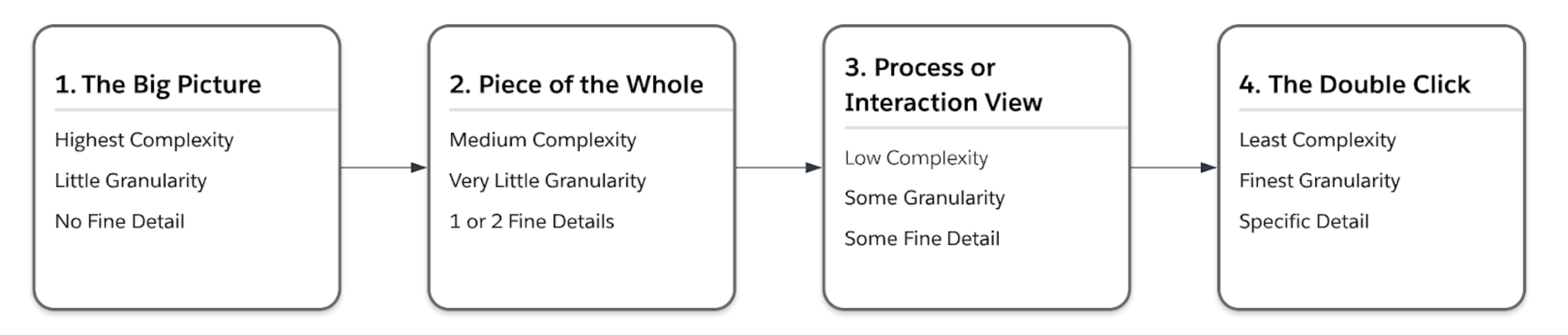
Levels of depth in visual communication can be categorized, as illustrated below, ranging from high-level framing to fine-grained detail.
Reading the room: nonverbal cues
Common expressions of nonverbal communication include facial expressions, gestures, body language, tone of voice, personal space, eye gaze, touch, and appearance. While these are often expressed unintentionally or as part of our personal way of communicating and presenting ourselves, they still send a message. Nonverbal messages are often more prone to encoding and decoding complexities than verbal and visual communication.
Using the audience in the photo below as an example, while they are all listening to a presentation, they are displaying different nonverbal cues. Even without additional context, it’s natural to begin interpreting what those cues might mean.

These impressions become part of the feedback loop in the communication building blocks, helping the sender assess whether their message is landing as intended. Because nonverbal communication is also closely tied to cultural context, those interpretations are not always reliable.
For example, technology stakeholders are sometimes perceived as more reserved than business stakeholders, who may appear more animated or direct. A brief response or limited eye contact may signal internal processing rather than disengagement, just as a strong reaction may reflect collaboration rather than opposition.
When it comes to nonverbal communication, keep the following in mind:
- Be aware of how you might be perceived: Whether presenting, conversing, or listening, consider how your nonverbal cues may come across to others. Just as with verbal and visual communication, adjust your approach based on your audience or conversation partner.
- Be aware of how you perceive: We all have preconceived notions of what “normal” nonverbal communication looks like, which can influence how we interpret intent or engagement. Recognizing these biases helps you adjust your perspective and communicate more effectively.
Applying this lens to our audience member looking at their phone during a presentation, it’s worth considering that while they could be playing Candy Crush, they could actually be taking notes instead.
Practicing how you talk like an architect
While some people might have a natural flair for communication, it is definitely a skill that can be cultivated and strengthened over time. Challenging your assumptions is an important part of an architect’s growth, and understanding different communication styles makes it easier to convey your message and understand your stakeholders.
As you refine your approach, remember these three key takeaways:
- Know your audience: Keep in mind what matters to them, how to keep them engaged and how to read them.
- Communicate with intention: Be clear about what you want to say and how you choose to express it.
- Be culturally aware: Understand that verbal and nonverbal differences vary across contexts and cultures.
Even with a stronger understanding of how to structure your message and read your audience, to talk like an architect, one important aspect of communication remains: listening.
Communication is not a one-way process. Join me in the final installment of this mini-series where we’ll focus on the two-way communication involved in listening and asking questions.
Subscribe to the Salesforce Architect Digest on LinkedIn
Get monthly curated content, technical resources, and event updates designed to support your Salesforce Architect journey.