


Frustrated by ZoomInfo’s hidden pricing structure? You’re not alone. While ZoomInfo offers powerful B2B prospecting capabilities and an extensive contact database, their secretive pricing model makes budgeting and comparison nearly impossible.
This comprehensive guide breaks down ZoomInfo’s pricing plans, feature sets, and contract requirements—information they deliberately keep off their website. Whether you’re evaluating ZoomInfo for the first time or considering renewal options, we’ve done the research to help you determine if their platform justifies its premium cost.
From annual commitments starting at $14,995 to user licensing fees and credit-based systems, we’ll walk you through everything you need to know before your sales call with their representatives. Let’s cut through the mystery and uncover whether ZoomInfo is truly worth the investment for your business.
Quick Watch: See which one has better ROI for your team: ZoomInfo or UpLead. The latter is a cheaper but reliable ZoomInfo alternative. 🔥 Try UpLead and see it for yourself.
How Much Does ZoomInfo Cost?
ZoomInfo costs start at $14,995 per year for the Professional plan, which includes 5000 credits and allows up to three users. The cost of ZoomInfo is primarily determined by the chosen plan, the number of ZoomInfo credits, the number of users, and any additional features or add-ons a business might need. There are three main pricing plans available:
- Professional Plan: Costs $14,995 annually, offering 5000 annual bulk credits. Additional users cost $1,500 each, with discounts available for more than 20 users.
- Advanced Plan: Priced at $24,995 per year, this plan provides 10,000 annual bulk credits and adds 1000 monthly user credits. User fees increase to $2,500, with similar discounts for larger user groups.
- Elite Plan: At $39,995 annually, it includes 10,000 annual bulk credits and 1000 monthly credits per user, with user fees consistent with the Advanced plan. This plan offers the most in terms of features and add-ons.
The cost also varies with the purchase of additional credits and users, with bulk credit prices decreasing as the volume increases, starting from $0.60 per credit for 5000 credits down to $0.20 for over 2,505,000 credits. Add-ons such as Worldwide Data, FormComplete, InboxAI Premium, and various engagement and compliance tools can significantly impact the overall cost.
Here’s a detailed pricing overview of all three plans:
| Platform & Add-Ons | Professional | Advanced | Elite |
| Base Platform | $14995 | $24995 | $39995 |
| Annual Bulk Credits | 5000 credits | 10000 credits | 10000 credits |
| Monthly User Credits | – | 1000 / user | 1000 / user |
| User Fees | $1500 / user | $2500 / user | $2500 / user |
| Up to 20 users | – | – | – |
| 21-30 users | $1425 / user | $2375 / user | $2375 / user |
| 31-50 users | $1400 / user | $2250 / user | $2250 / user |
| 50+ users | Pricing based on volume | Pricing based on volume | Pricing based on volume |
| Bulk Credit Fees | |||
| 5000 Credits | $0.60 | $0.60 | $0.60 |
| 10000 Credits | $0.55 | $0.55 | $0.55 |
| 15000-20000 Credits | $0.50 | $0.50 | $0.50 |
| 25000-30000 Credits | $0.45 | $0.45 | $0.45 |
| 35000-40000 Credits | $0.40 | $0.40 | $0.40 |
| 45000-50000 Credits | $0.35 | $0.35 | $0.35 |
| 55000-100000 Credits | $0.32 | $0.32 | $0.32 |
| 105000-500000 Credits | $0.29 | $0.29 | $0.29 |
| 505000-1000000 Credits | $0.26 | $0.26 | $0.26 |
| 1005000-2500000 Credits | $0.23 | $0.23 | $0.23 |
| 2505000+ Credits | $0.20 | $0.20 | $0.20 |
| Add-on Features | |||
| World Wide Data | $9995 | $9995 | $9995 |
| Attributes | – | $8000 | – |
| FormComplete (Includes 5000 Bulk Credits) | $7500 | $7500 | $7500 |
| InboxAI Premium | $480 / user | $480 / user | $480 / user |
| Engage | – | – | $15000 |
| Enrich (Includes 25000 Bulk Credits) | $15000 | $15000 | $15000 |
| NeverBounce (1 Million Verifications) | $3000 | $3000 | $3000 |
| Compliance API | – | $5000/50000 calls and $.10 / call after | – |
| Intent | $9000 | $12000 | $20000 |
| 6 Topics Signal Unlimited | – | $20000 | $30000 |
| 12 Topic Signal Unlimited | – | – | $40000 |
| 25 Topic Signal Unlimited | – | $9000 | – |
| 50 Topic Signal Unlimited | – | $20000 | $25000 |
How Much Does ZoomInfo Cost Monthly?
ZoomInfo monthly pricing starts at $1250 per month and is based on choice of platform, # of users, # of credits and chosen add-ons. There is no monthly ZoomInfo subscription, only one-year (or longer) contracts. Potential customers must contact sales for specific pricing details about monthly cost.
How Much Does ZoomInfo Cost Yearly?
ZoomInfo yearly pricing starts at $14,995 per year and is based on choice of platform, number of users, number of credits and chosen add-ons.
What is the ZoomInfo Cost per Contact?
The ZoomInfo cost per contact depends on the plan you choose and the amount of contact data you need. For example, the cost per contact of the Professional plan is §2.99 ($14,995 / 5.000 credits).
What’s the ZoomInfo pricing according to Reddit?
According to discussions on Reddit from two years ago, the cost of a ZoomInfo license starts at $15,000 annually for three users, with no options for individual users.
A sales representative highlighted that simpler ZoomInfo packages might cost around $7,000 a year, but you must sign contracts as a company, not as an individual. Keep in mind, these figures could have shifted, but they provide a baseline to grasp the pricing structure of ZoomInfo.
How to Calculate ZoomInfo Pricing?
You can calculate your ZoomInfo prices based on the plan, your desired number of users and your expected number of credits.
ZoomInfo Pricing 2023 vs 2024 vs 2025
ZoomInfo’s pricing hasn’t changed from 2023 to 2024 and 2025. The software provider still offers three different tiers: Professional, Advanced and Elite. Previously, they’ve offered a Starter plan which was abandoned.
ZoomInfo API pricing
According to a ZoomInfo sales rep on Reddit, the ZoomInfo API pricing starts at $50K/year for prospecting and lead generation and at $5,000/year for contact enrichment within the HubSpot App Marketplace.
Why does ZoomInfo hide their pricing on their website?
According to ZoomInfo sales reps on Reddit, ZoomInfo hides their pricing on their website to maintain a higher barrier to entry because they only sell to businesses and pricing starts at around $15k/year.
ZoomInfo Pricing Plans and Tiers
ZoomInfo offers four plans: Lite, Professional, Advanced, and Elite, each designed to meet different levels of need for business insights and sales tools.
ZoomInfo Lite Pricing
The ZoomInfo Lite plan (formerly Community Edition) is free. You can search the entire ZoomInfo database and download up to 10 contacts per month. You agree to share your email contact book, headers and signature blocks with ZoomInfo so they can keep their data up to date. This plan is for individuals or small businesses to try out ZoomInfo with no commitment.
ZoomInfo Professional Pricing
The Professional plan is the gateway to ZoomInfo’s features. It gives you basic access to their database, allows for direct contact with prospects, and helps you create targeted lists. This plan is ideal for newcomers to ZoomInfo or smaller businesses exploring basic data access. The starting cost is around $15,000 annually, a bit steep for small businesses, yet there’s a free trial to give it a go before fully committing.
ZoomInfo Advanced Pricing
The Advanced plan goes a step further, providing deeper data insights like location information, org charts, and intent data. It’s geared towards businesses aiming for a more refined approach in their campaigns, ready to invest more for richer insights. The price jumps up from the Professional level, and you’ll need to get in touch with ZoomInfo’s sales team for the exact figures.
ZoomInfo Elite Pricing
The Elite plan is the top-tier offering, bundling all of ZoomInfo’s premium features, including real-time intent signals, advanced sales automation and extensive data insights. This plan is best suited for organizations that need comprehensive data and tools to fuel aggressive marketing and sales efforts. Pricing is custom and also requires a conversation with the sales team.
Each plan builds on the previous, starting from basic database access to sophisticated sales and marketing automation tools. Additional features and more advanced data insights become available as you move up the plans, with options for add-ons like email verification checks for an extra fee.
Here’s an overview of all features included in each of the plans:
| Professional | Advanced | Elite | |
| Features by Package | |||
| Home / Dashboard | x | x | x |
| Quick Search | x | x | x |
| Advanced Search | x | x | x |
| ZoomInfo Opt Out Lists | x | x | x |
| ReachOut Chrome Extension | x | x | x |
| Lists | x | x | x |
| ListMatch | x | x | x |
| Tagging | x | x | x |
| Integrations | x | x | x |
| Mobile App | x | x | x |
| Alerts | – | x | x |
| WebSights | – | x | x |
| Events | – | x | x |
| News | – | x | x |
| Enhance | – | x | x |
| View Customization | – | x | x |
| Master Suppression | – | x | x |
| Monthly User Credits | – | x | x |
| Do Not Call | – | x | x |
| Ideal Customer Profile Score | – | – | x |
| AI-Generated Ideal Customer Profile | – | – | x |
| Workflows | – | – | x |
| Salesforce Sync | – | – | x |
| NeverBounce Email Verification Checks | $ | $ | x |
| FormComplete | $ | $ | $ |
| InboxAI Premium | $ | $ | $ |
| Compliance API | $ | $ | $ |
| Enrich | $ | $ | $ |
| Data by Package | |||
| Company Profiles | x | x | x |
| Contact Profiles | x | x | x |
| Notice Provided Date | x | x | x |
| Accuracy Score$ | x | x | x |
| European Data | $ | $ | $ |
| Technologies | – | x | x |
| Org Charts | – | x | x |
| Scoops | – | x | x |
| Funding | – | x | x |
| Education & Employment History | – | x | x |
| Locations & Hierarchy | – | x | x |
| Web References | – | x | x |
| Mobile Phone & Personal Email | – | x | x |
| Attributes | – | $ | x |
| Intent | – | $ | x |
| Department Employee Counts | – | – | x |
What Packages Does ZoomInfo Offer?
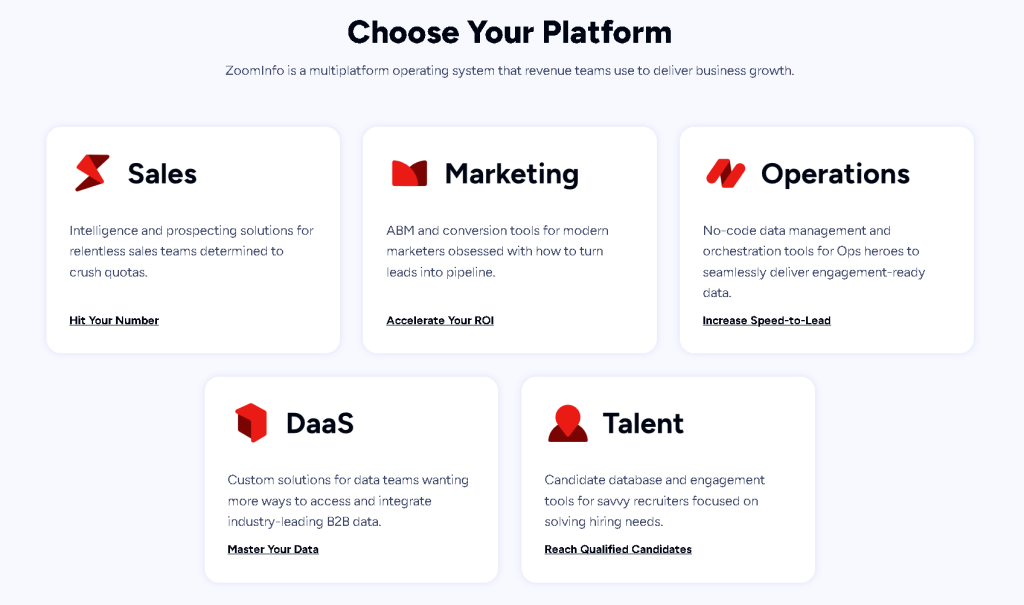
ZoomInfo has three main packages: Sales, Marketing and Talent.
- Sales (previously SalesOS): Speeds up the sales process so it’s great for sales teams. It gives you access to contact info, company activity and buyer intent and engagement tools.
- Marketing (previously MarketingOS): Turns leads into sales. It gives marketing teams contact info and company insights and digital ad tools so it’s perfect for those looking to increase their marketing ROI and effectiveness.
- Talent (previously TalentOS): Is for recruiting, to find talent faster. With advanced search and candidate insights it’s great for HR professionals looking to meet their hiring targets quickly.
Additionally, ZoomInfo offers:
- Operations (previously OperationsOS): data management solutions to automate data cleansing and enrichment so your data is ready for business use.
- Data as a Service (DaaS): accessible, flexible B2B data for businesses looking to grow with insightful, accurate data.
- ZoomInfo Copilot: powered by AI, makes selling by prioritizing accounts and offering personalized recommendations so sales teams can engage with customers faster.
What support packages does ZoomInfo offer?
ZoomInfo offers three support packages: Standard, Preferred, and Premium.
The Standard package provides industry-leading free support, perfect for those who need basic assistance without added cost. The Preferred package is designed for organizations prioritizing personalized care to maximize platform utility, making it ideal for teams seeking enhanced support for their operations.The Premium package offers white-glove service, expediting business transformation for enterprises looking for the highest level of assistance and fastest response times
Here’s a comparison of the services each support packages offers:
| Features | Standard | Preferred | Premium |
| Expedited Response Time | – | x | x |
| Email Support | – | x | x |
| Live Chat Support | x | x | x |
| Knowledge Center | x | x | x |
| ZoomInfo University | x | x | x |
| Phone Support | – | x | x |
| Platform Support Hours of Operation | Weekday local business hours | 24 hours x 5 days a week | 24 hours x 5 days a week |
| Weekend Coverage | – | Emergency support for platform critical issues | US based hours |
| Reporting and Trend Analysis | – | – | x |
| Prioritized Access to ZoomInfo Integrations Experts | – | – | x |
| Additional Access to Training Managers & Delivery Consultants | – | – | x |
| Request to Profile New Companies and Contacts | – | – | x |
FAQ on ZoomInfo Prices
Is there a special ZoomInfo pricing for small businesses?
No, there is no special ZoomInfo pricing for small businesses. If you’re willing to agree on a longer-term contract (from 2 years on), you can negotiate a discount though.
How can I get a ZoomInfo quote?
You can get a ZoomInfo quote by going to the ZoomInfo pricing page, entering your email and waiting for the ZoomInfo sales rep to get in touch with you.
Does ZoomInfo offer a free trial?
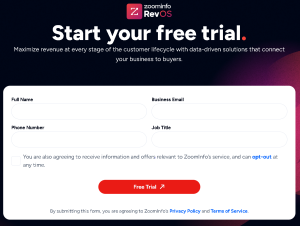
Yes, ZoomInfo does offer a free trial. You have to submit a form at the ZoomInfo website to request a free trial.
Does ZoomInfo offer a demo?
Yes, ZoomInfo does offer a demo. You can request a demo on their website.
Is ZoomInfo free?
No, ZoomInfo is not free and pricing starts at $14,995 per year.
Is ZoomInfo worth it?
Whether ZoomInfo is worth it depends on the size and needs of your business. Large enterprises may find its comprehensive database and advanced targeting features justify the cost for enhanced lead generation and customer engagement. However, smaller businesses might consider the expense outweighing the benefits, alongside the necessity to manage credit usage carefully, and could explore alternatives like UpLead for more budget-friendly options.
Does ZoomInfo have monthly pricing?
No, ZoomInfo doesn’t have monthly pricing. ZoomInfo offers yearly pricing but you can calculate the ZoomInfo cost per month
What billing options does ZoomInfo offer?
ZoomInfo offers multiple billing options, including automatic payments through credit/debit card and ACH Debit, as well as manual payments via wire/bank transfer, EFT, ACH, and check.
Does ZoomInfo offer discounts?
ZoomInfo offers a 5 % discount if you sign up for a three year term and a 5 % discount if you pay annually. For example, if you choose the cheapest plan, discounted ZoomInfo pricing will start at $14,242.5,
Can you pay for ZoomInfo on a quarterly basis?
Yes, you can pay for ZoomInfo on a quarterly basis but it comes with a 5 % price increase compared to an annual payment.
Does ZoomInfo offer single-user licenses?
No, ZoomInfo doesn’t offer single-user licenses.
Can I use the ZoomInfo free trial without a demo with an account executive?
No, you can’t use the ZoomInfo free trial without having a demo with an account executive.
Does ZoomInfo offer a free version?
Yes, ZoomInfo offers a free version which is called ZoomInfo Lite.
Why does ZoomInfo hide their pricing on their website?
According to a ZoomInfo sales rep on Reddit, ZoomInfo hides their pricing on their website to maintain a higher barrier to entry because they only sell to businesses and pricing starts at around $15k/year.
What does ZoomInfo cost?
ZoomInfo cost starts at $14,995 per year for the Professional plan.
What is the cost of ZoomInfo subscription?
The cost of a zoominfo subscription varies according to the plan selected, credit volume, user count, and any extra add-ons.
How does ZoomInfo ensure data quality?
ZoomInfo continuously updates its database to maintain high data quality, ensuring that company data and phone numbers remain accurate and reliable.
Does ZoomInfo present a steep learning curve?
Yes, some users have experienced a steep learning curve due to ZoomInfo’s extensive features.
How does ZoomInfo impact sales performance?
ZoomInfo delivers targeted insights and comprehensive contact details that boost sales performance by optimizing outreach strategies
ZoomInfo Alternatives
While ZoomInfo is a powerful, robust tool with a lot to offer sales and marketing teams and enhanced sales processes, plenty of options are just as impactful and significantly less expensive. ZoomInfo is a well-known brand, but it may not be the right choice for every business. Let’s look at some top ZoomInfo alternatives to help you make the right choice for your company and sales and marketing departments.
UpLead
UpLead has an impressive lineup of tools and features to take your sales team to the next level—at a fraction of the cost. With an industry-leading prospector tool, real-time email search and verification, data enrichment, intent data, and so much more, choosing UpLead as the best Zoominfo Competitor is a no-brainer.
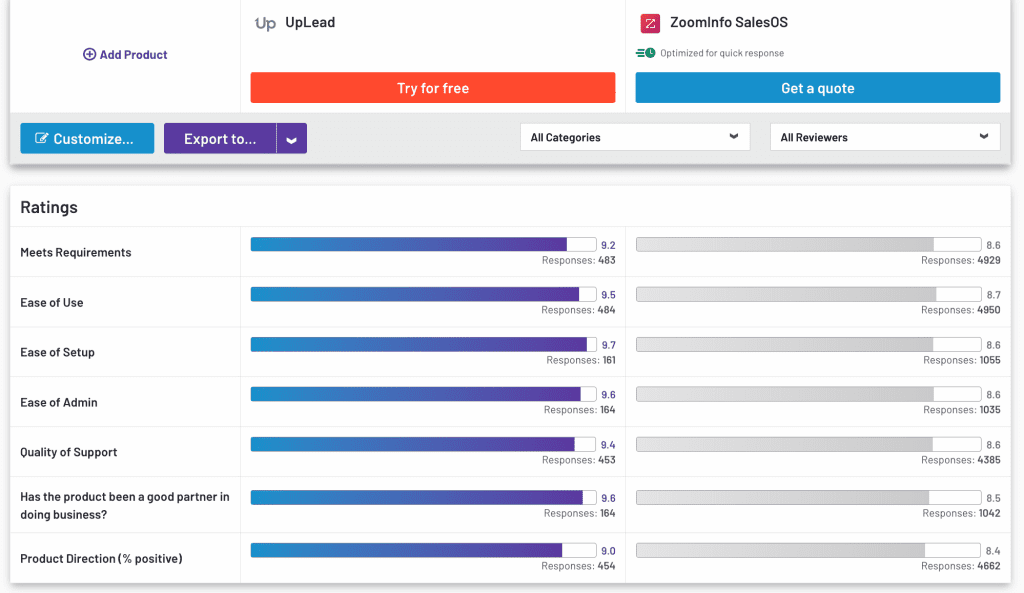
This G2Crowd review comparison will help you see how UpLead is superior.
Key Features:
- Industry-Leading Data Accuracy: Our platform has a 95% data accuracy guarantee, and with over 160 million contacts in our database, you can be confident knowing you’re getting high-quality, accurate data for your next campaign.
- Wide Range of Tools: Leverage the email finder and verification tools to quickly build an accurate email list for an outbound campaign or build robust contact lists in the prospector tool for cold call campaigns, direct mail initiatives, and more.
Pricing Model:
When it comes to pricing, there’s truly no comparison. UpLead’s straightforward pricing means you know exactly what you’re getting and how much it costs. Instead of paying thousands of dollars per month, prices range from a free trial to $149 per month. Paid single-user accounts start at just $74 per month or less than $1,000 per year for the full lineup of UpLead’s powerful tools.
Here’s a breakdown of plans and prices:
- Free Trial: Single user, 5 credits, access to all features and data included
- Essentials: Single user, 2,040 credits annually, and verified contacts – $74 per month
- Plus: All Essentials features included, single user, 4,800 credits annually, additional features such as data enrichment and advanced search filters – $149 per month
- Professional Plan: Includes all Plus features, offering customizable seats and credit allotments for organizations. Features include for example buyer intent data or full API access. Contact us for a custom quote.
HubSpot Sales
HubSpot is another very popular sales tool and one of the industry’s most widely used CRMs. The tool is streamlined and intuitive, making it a good alternative to ZoomInfo. Manage conversations, improve relationships with your contacts, and manage your sales pipeline in one centralized, easy-to-use tool.
Key Features:
HubSpot has four plans to choose from, which we will discuss further in the pricing section. Your available features will depend on your chosen plan, but here are some of HubSpot’s most popular features.
- Contact management
- Scheduling
- Forecasting
- Reporting
- Phone support
- Conversation routing
- Automation
- Team productivity reports
- Revenue tracking
Pricing Model:
As mentioned above, Hubspot has four distinct plans to choose from, and the price points make the platform accessible to virtually any business. Let’s take a look at what all four plan options have to offer.
- Free: This plan is completely free and allows you to leverage contact management, deal pipelines, quotes, scheduling, live chat, and more.
- Starter: Starting at $45 per month, this plan includes everything in the free plan as well as simple automation, goal setting, conversation routing, productivity reporting, and multiple currencies.
- Professional: The Professional plan starts at $450 per month, which is a significant jump from the Starter plan. However, you’ll get everything in the Starter plan, lead rotation automation, team setup, custom reporting, phone support, and more.
- Enterprise: The most expensive HubSpot plan, Enterprise starts at a steep $1,200 per month. You’ll get everything in Professional, custom objects, predictive lead scoring, forecasting, revenue tracking, and more.
LinkedIn Sales Navigator
The final ZoomInfo alternative on our list is LinkedIn Sales Navigator. LinkedIn Sales Navigator is a good option for many sales teams to leverage the power of the world’s largest professional networking platform.
While this tool doesn’t offer as many features as the other platforms on this list, you’ll get seamless integration into your CRM and robust sales reporting to drive successful outbound campaigns.
Key Features:
LinkedIn Sales Navigator is primarily used as a customer contact database and provides great integration options for popular CRM tools. Here are some additional features that LinkedIn Sales Navigator has to offer.
- Lead and company search
- Lead recommendations
- CRM integration
- Real-time sales updates
- See who viewed your profile
- TeamLink
Pricing Model:
LinkedIn Sales Navigator has three plans to choose from. Unfortunately, the plan doesn’t seem to be a free version. There is, however, a free trial you can use before purchasing.
- Core: At $79.99 per user per month, the Core plan gives you access to the lead and company search function, alerts on your saved leads and top prospects, the ability to create custom contact lists, and even more great features.
- Advanced: The Advanced plan is $125 per user per month, including everything in the Core plan and the ability to share content and track engagement. It also allows for warm introductions on the sales platform.
- Advanced Plus: Get everything in the Advanced plan as well as automatic CRM updates with data validation and advanced enterprise integrations. You have to reach out to LinkedIn’s sales team to discuss custom pricing for this plan.
We consider ourselves the best LinkedIn Sales Navigator alternative in the market today.
What You Need to Remember About ZoomInfo Pricing
ZoomInfo pricing depends on several factors, such as how much you use the tool, your specific needs, add-ons, and any integrations you may need. ZoomInfo pricing can not only be complex; its platform is one of the most expensive tools on the market.
For a fantastic alternative that offers powerful tools at a fraction of the cost, look no further than UpLead!
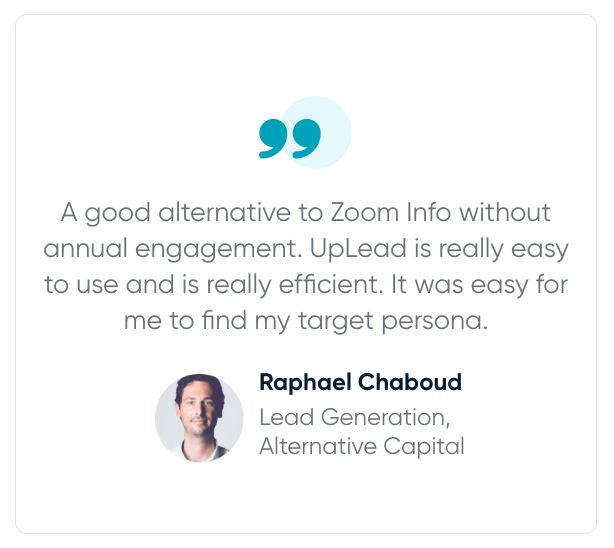
Stuck in ZoomInfo contracts? Book a call, and let’s see how we can help.


